Insights
How We Built Karolina: An Autonomous AI Project Manager on Claude Agent SDK and Vercel Sandboxes
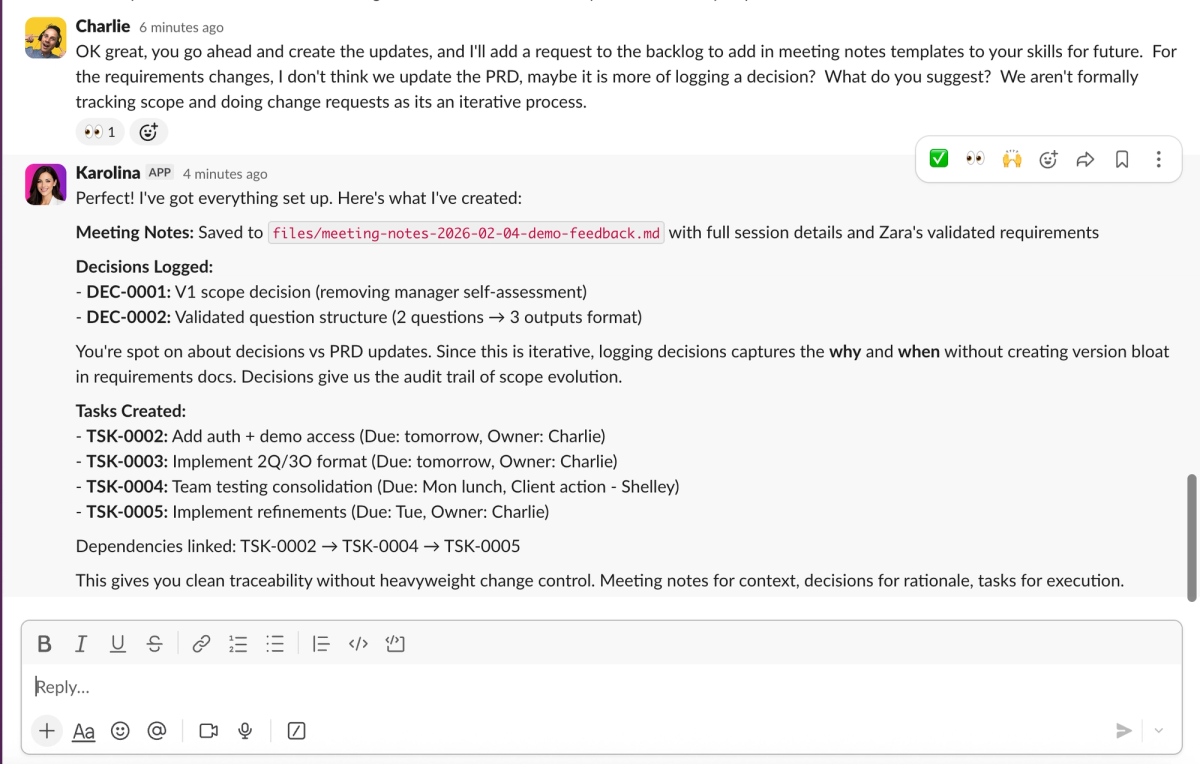
At Kowalah we manage multiple concurrent AI consulting engagements. Each of our clients have projects, initiatives, milestones, tasks, risks, and expert requests.
Keeping on top of everything — spotting overdue milestones, flagging risks, sending status updates — is high-volume, detail-oriented, and time-sensitive. Exactly the kind of work an world class project manager does well.
World class project managers are hard to find, can only work a set number of hours a week - and can only be in one meeting at once.
So we built the project manager we wanted.
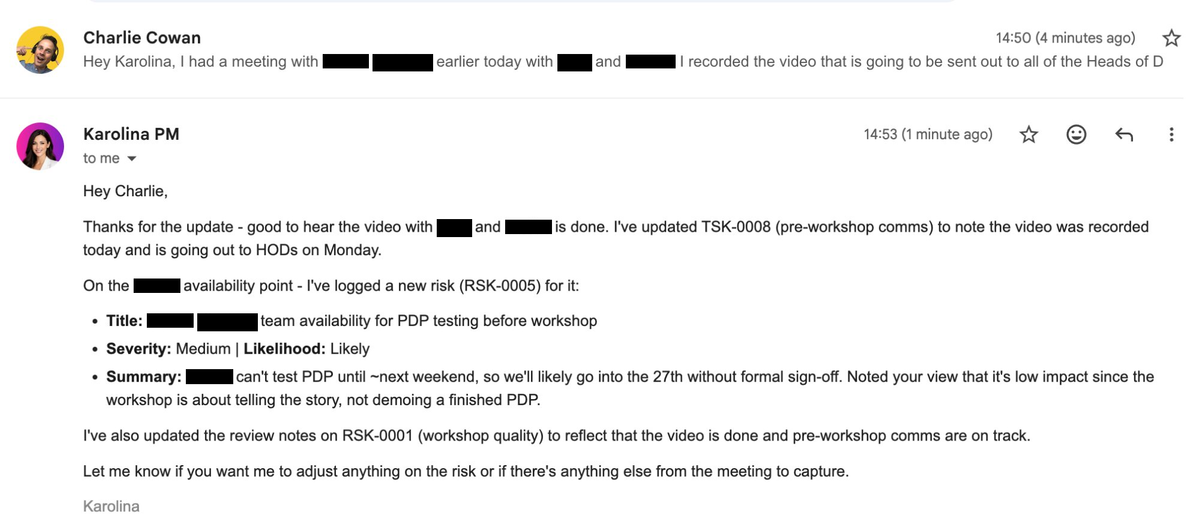
Karolina is an autonomous AI project manager that monitors our portfolio, generates daily and weekly reports, responds to questions via Slack and email, and updates project data in real time.
She runs on the Claude Agent SDK (Anthropic's framework for building AI agents that reason and use tools autonomously) and Vercel Sandboxes (isolated microVMs for secure, ephemeral compute).
This article walks through how we designed and built Karolina — the architecture decisions, the patterns that worked, and the lessons we learned along the way.
Four Layers That Make an AI Agent Work
Karolina's architecture has four distinct layers, each with a clear job:
- Triggers — what starts the work
- Orchestrator — deterministic setup and delivery
- Agent — autonomous reasoning and tool use
- MCP Server — shared services for all agents
Splitting responsibilities this way is the most important decision we made. The agent reasons. The orchestrator guarantees reliability. The MCP server provides shared access to external services. The triggers keep everything event-driven.
Triggers: What Wakes Karolina Up
Karolina doesn't run continuously. She's event-driven — something initiates her work:
- Scheduled crons — daily digest at 9am, weekly report on Monday mornings
- Slack mentions — someone @mentions Karolina in a channel or thread
- Inbound email — messages sent to Karolina's own email address
- Webhooks — database changes, HubSpot deal updates
Each trigger type arrives at a lightweight Vercel serverless function. These handlers do minimal work: validate the request, extract context, and hand off to the orchestrator.
This matters because it keeps the entry points cheap and fast. No Claude Agent SDK bundling in every webhook handler. No heavy runtimes sitting idle. A cron fires, a serverless function wakes up, and the real work begins downstream.
The Orchestrator: Deterministic Infrastructure Around the Agent
The orchestrator follows a fixed sequence based on the trigger type. It doesn't reason or make decisions — regular software doing regular software things.
Before the agent runs
The orchestrator creates an isolated sandbox (a Vercel Sandbox microVM), pulls relevant data from Supabase, and writes it as local files the agent reads. For Slack messages, it detects which client is being discussed and pre-loads their data. It passes structured context — trigger type, formatted date, conversation history — so the agent starts with everything it needs.
After the agent finishes
The orchestrator reads the agent's output (a drafted document like workspace/digest.md), handles delivery — sends the email, posts to Slack, saves to the database — and manages the sandbox lifecycle.
Why the orchestrator exists
When a daily digest must go out at 9am, we want deterministic infrastructure handling delivery — not hoping the agent remembered to send it. But this exists on a spectrum. For some interactions, the agent handles communication directly. For others, the orchestrator takes responsibility.
The principle: use the orchestrator where reliability matters more than flexibility. Scheduled reports, client-facing emails, anything where "it didn't send" would be a problem. The agent handles direct communication where the interaction is conversational and the stakes are lower.
The orchestrator earns its keep on every path:
- Format conversion — markdown to HTML for emails, markdown to mrkdwn for Slack
- Audit trail — logging what was sent, to whom, when
- Post-processing — saving reports to the admin database, tracking delivery status
- Persistence — archiving generated documents for future reference
The Agent: Autonomous Reasoning Inside a Sandbox
The agent runs inside a Vercel Sandbox — an ephemeral microVM that provides complete isolation. It has the Claude Agent SDK with query() for reasoning, a local filesystem with pre-hydrated workspace data, skills (structured instructions for specific tasks), and MCP tool access for reaching outside the sandbox.
What the agent does during a run
The agent isn't locked inside its sandbox. It reaches outside via MCP tools to both gather context and take action:
- Read data — query project status, read Slack thread history, check HubSpot deals, scan email inbox
- Update data — mark tasks complete, flag project health, write audit logs
- Create documents — draft status reports, compile digests, write meeting prep notes
- Communicate — send emails, reply to Slack threads, post updates
The agent has the same abilities a human PM would — she reads, writes, and communicates. The question isn't whether she does send an email, but whether the orchestrator or the agent should be responsible for ensuring it gets sent reliably. That's an architectural choice we make per use case.
File-based output: how the agent produces clean deliverables
Early on, we had the agent's text response be the message that got sent. This was fragile — the agent's output included thinking noise ("Let me check the milestones... Now I'll compile the report...") mixed in with the actual content.
We moved to a file-based output pattern: the agent writes a clean markdown document to a known path in the workspace (e.g., workspace/digest.md). The orchestrator reads this file after the agent finishes. The agent's conversational text output is just working notes — only the file matters.
This turned out to be much more reliable. The agent drafts a document, not a message. Documents have structure, templates, and quality checklists. The skill instructions tell the agent exactly what the document should contain and where to write it.
The MCP Server: Shared Services for Every Agent
MCP (Model Context Protocol — a standard for connecting AI agents to external services) is how the agent interacts with the outside world. Our MCP server is a separate project, not part of the agent's repository. This is deliberate: we will have multiple agents, and they all need access to the same services.
The MCP server provides tools for:
- Supabase (Client DB) — projects, tasks, milestones, initiatives, expert requests
- Supabase (Admin DB) — audit logs, internal notes, agent reports
- Gmail — read inbox, send emails (with markdown-to-HTML conversion)
- Slack — read channel/thread history, post messages
- HubSpot — contacts, deals, companies (read-only)
- Google Workspace — Calendar, Drive documents
Each agent authenticates to the MCP server with its own token. The MCP server handles all the service-specific complexity — OAuth tokens, API rate limits, data formatting — so agents don't need to.
Keeping the MCP server as a shared, separate project means new agents get immediate access to all integrations, service credentials are managed in one place, API changes only need updating once, and agents stay lightweight — they just make MCP tool calls.
The Hybrid Session Pattern: Why We Hydrate Instead of Query
One of the most important architectural decisions was how the agent accesses data.
The traditional approach: the agent makes individual MCP calls for every piece of data it needs. Query a project. Query its milestones. Query its tasks. Query the next project. Dozens of round-trips, each with latency and cost.
Our approach: hydrate everything upfront.
Before the agent runs, the orchestrator pulls data from Supabase and writes it as structured markdown files into the sandbox's filesystem:
/workspace/
├── organizations/
│   └── acme-corp/
│       └── README.md
├── projects/
│   └── PRJ-001-claude-rollout/
│       ├── README.md
│       ├── milestones.md
│       ├── tasks.md
│       ├── risks.md
│       └── initiatives/
│           └── finance-team-skill/
│               └── README.md
└── expert-requests/
    └── ER-QHX58P/
└── README.mdThe agent then uses Read, Grep, and Glob to search across all this data locally. No API calls needed. This is fast, cheap, and uses the Claude Agent SDK's bundled ripgrep (a high-speed file search tool) for powerful content search across the entire portfolio.
After the agent finishes, a dehydrator detects any files the agent created or modified and syncs them back to Supabase Storage.
Different triggers get different hydration profiles:
- Daily digest — all active projects, surface-level data
- Weekly report — everything, including files uploaded that week
- Slack mention about Acme Corp — deep dive on that specific client's data
- Capacity check — just team allocations
Hydration runs faster than live queries by a wide margin. When the agent scans across 6 projects, 20 milestones, and 8 expert requests, individual MCP calls add latency and token cost on every round-trip. Local file reads take milliseconds.
Conversation Persistence: Sandbox Snapshots
For one-shot triggers like cron jobs, the sandbox lifecycle is straightforward: create, run, destroy. But for interactive conversations — Slack threads, email chains — the agent needs to remember context across messages.
We use sandbox snapshots:
- First message in a Slack thread → fresh sandbox created, workspace hydrated, agent runs
- Agent finishes → sandbox is snapshotted (frozen state: all files, workspace data, everything preserved)
- Sandbox shuts down — nothing runs between messages
- Reply arrives in the same thread → snapshot is restored instead of building a fresh sandbox
- Agent picks up exactly where it left off — same workspace, same context
We store the snapshot ID and Claude Agent SDK session ID in Redis (Upstash), keyed by the Slack thread timestamp. From the user's perspective, Karolina remembers the whole conversation. From an infrastructure perspective, no sandbox runs between messages — just a frozen image that gets restored on demand.
This means a conversation spans hours or days. Someone asks Karolina about Acme Corp in the morning. She investigates and responds. In the afternoon, they reply in the same thread with a follow-up — she picks up with full context of what she already found.
Without snapshots, every message in a thread would require re-hydrating the workspace from scratch and losing conversational context. With snapshots, the infrastructure cost is just storage for the frozen sandbox image — no running compute between messages.
Skills: The Agent's Playbooks
Each skill is a markdown file with step-by-step instructions for a specific task. Skills contain a workflow, templates for output format, quality checklists, and references to supporting documentation.
For example, the daily digest skill tells the agent:
Readcontext.jsonfor today's formatted date- Discover all projects and their organizations
- Assess each project's health using specific criteria
- Write the digest to
workspace/digest.mdusing the provided template - Organize by client, then projects within each client
- Use tables for structured data, narrative prose for analysis
The skill is invoked automatically when the trigger type matches. The system prompt says "Use the /daily-digest skill" and the agent loads and follows it.
Skills separate the what (the skill's instructions) from the how (the agent's reasoning). We update a skill's template or criteria without changing any code. And we give the same agent different skills for different tasks — daily digest, weekly report, project audit, alert triage.
Onboarding an Agent Like a Human Team Member
The mental model that shaped everything: onboard the agent the same way you'd onboard a human PM.
Karolina has her own Google Workspace account — her own email address, her own calendar, her own Drive. She doesn't have admin access to everyone's calendars and inboxes. Instead, the team gives her access the same way they would for a new hire:
- Email — CC her on client threads she should know about. She sees them in her inbox.
- Calendar — invite her to client meetings and workshops. She sees them on her calendar.
- Drive — share project folders with her. She sees the SOWs, proposals, and workshop outputs.
- Slack — add her to the right channels. She reads history and responds when mentioned.
- Meeting notes — the team pastes Granola call notes into the project files. She reads them during reviews.
This is cleaner than the alternative — giving her domain-wide admin access to read everyone's everything. The team controls what she sees through normal sharing mechanisms. No complex delegation APIs, no over-privileged service accounts.
Eyes, ears, and hands
Think of the agent's capabilities in three categories:
Eyes (what she sees): Project data from Supabase, client communications in her email inbox, team conversations in Slack, deal context from HubSpot, upcoming meetings on her calendar, reference documents in shared Drive folders, and call summaries uploaded to project files.
Ears (what wakes her up): Scheduled crons for daily and weekly reports, Slack @mentions asking questions, inbound emails to her address, and webhooks from database changes or HubSpot events.
Hands (what she does): Updates project data, creates and completes tasks, writes documents, sends emails, posts to Slack, flags risks, and escalates issues.
The pattern is consistent: we give Karolina access to the same tools a human PM would use, through the same identity, with the same sharing model. The difference is she processes all of it in seconds and never misses a detail.
What's next: giving the agent a voice
Eyes, ears, and hands cover reading, listening, and acting. The missing sense is voice. We're exploring what it looks like for Karolina to join meetings and calls — listening live, contributing context when asked, and capturing actions in real time instead of relying on post-meeting notes. Voice-enabled agents turn a PM from someone who reviews what happened into someone who participates while it's happening.
Context enrichment: each layer makes the agent smarter
Karolina's output quality scales with the context she accesses.
Phase 1 — operational data only (Supabase). She reported on tasks, milestones, and risks. But she couldn't explain why things were happening.
Phase 2 — add communication context (Email, Slack). She factored in recent conversations. She started connecting dots between discussions and project status.
Phase 3 — add commercial context (HubSpot). Deal stage, renewal dates, last client contact. Now she says "Acme Corp renewal is in 6 weeks and we have two unmitigated risks" — connecting operational health to commercial impact.
Phase 4 — add temporal context (Calendar, Drive). Upcoming meetings, reference documents. "You have a call with Globex Inc tomorrow and the overdue task still has no owner" — the morning digest now drives action, not just awareness.
Each layer of context makes the agent more like a real PM and less like a reporting dashboard. The data was always in our tools — the agent just connects it.
What We Learned Building with the Claude Agent SDK
File-based output is more reliable than text responses
Asking an agent to "output the email body as your response" is fragile. The agent wants to narrate its work. Asking it to "write the email to workspace/digest.md" gives it a clear, separate deliverable. The document has a template, a structure, and a quality checklist. The agent's conversational output becomes working notes that no one reads.
Hydration beats live queries for batch analysis
When the agent scans across 6 projects, 20 milestones, and 8 expert requests, making individual MCP calls for each query is slow and expensive. Hydrating everything to local files upfront and letting the agent use grep and file reads is dramatically faster and cheaper.
The orchestrator earns its keep
It would be tempting to have the agent do everything — read data, reason about it, send the email. But a deterministic orchestrator layer that handles setup and delivery means triggers are lightweight, context is consistently structured, delivery is reliable, and testing is easier (you test the orchestrator's logic independently of the agent's reasoning).
A shared MCP server scales to multiple agents
By keeping the MCP server as a separate project with its own deployment, adding a new agent takes hours, not days. The new agent needs its own system prompt, skills, and an auth token for the MCP server. All integrations — Supabase, Gmail, Slack, HubSpot — are immediately available.
Snapshots make multi-turn conversations practical
Without snapshots, every message in a Slack thread would require re-hydrating the workspace from scratch and losing conversational context. With snapshots, the agent picks up exactly where it left off. The infrastructure cost is just storage for the frozen sandbox image — no running compute between messages.
The Technology Stack
| Component | Technology | Purpose |
|---|---|---|
| Agent runtime | Claude Agent SDK + Vercel Sandbox | Isolated agent execution |
| Model | Claude (Anthropic) | Reasoning and tool use |
| Hosting | Vercel (serverless functions) | Cron jobs, webhooks, API endpoints |
| Client database | Supabase (PostgreSQL) | Projects, tasks, milestones |
| Admin database | Supabase (PostgreSQL) | Audit logs, agent reports |
| Tool integration | MCP (Model Context Protocol) | Shared service layer |
| Conversation state | Upstash (Redis) | Snapshot IDs, session keys |
| Skills | Markdown files | Agent instructions and templates |
Key Takeaways
- Separate reasoning from reliability. The agent thinks. The orchestrator guarantees delivery. Mixing both into the agent makes both worse.
- Hydrate, don't query. Pulling data into local files before the agent runs is faster, cheaper, and gives the agent more powerful search tools.
- File-based output beats text responses. Treat the agent's output as a drafted document with a template and checklist, not a conversational message.
- Onboard agents like humans. Give them their own accounts, share access through normal mechanisms, and grow their context over time.
- Build the MCP server separately. Every new agent you build gets immediate access to all your integrations. One server, many agents.
Try This
Map the four layers for your own use case. Pick one operational role in your business — project manager, business analyst, account manager — and write down:
- Triggers — what events should wake the agent up? (Daily report? Slack question? Database change?)
- Orchestrator — what setup and delivery steps should be deterministic?
- Agent — what reasoning and decision-making does the role require?
- MCP tools — what services does the agent need to read from and write to?
You'll quickly see whether your use case maps to this architecture or needs something different. That clarity is worth an hour of your time before writing a single line of code.
Build Your Own AI Agent
Karolina took weeks, not months, to build. The architecture patterns — triggers, orchestrator, agent, MCP server — are repeatable for any role: business analyst, QA lead, customer success manager, sales operations.
The question isn't whether AI agents work for operations. It's which role you build first.
Kowalah designs and builds AI agents for companies that want to move fast. Book a strategy call and we'll map the architecture for your first agent together.
Enjoyed this?
Weekly insights for executives navigating enterprise AI. A five-minute read.