Insights
To build agents - start with a whiteboard and post its
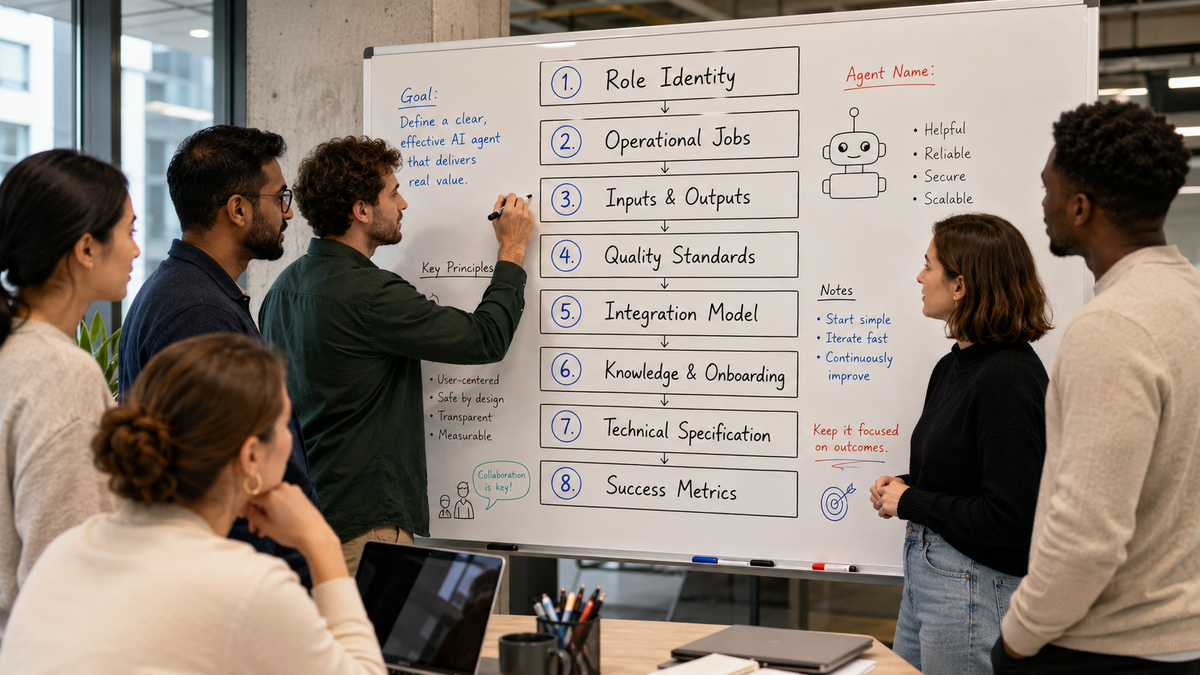
When we start building agents for clients we pick up a pen instead of a keyboard.There is a creative process that comes from having the right people in a room, a whiteboard, and some post it notes.Here are the eight topics we walk through.
1. Role identity
Before we get into what the agent does we want to understand who the agent is.If this was a human what would their role be? Name a human you've worked with before that did this role.
- What is their name?
- Who do they report to?
- Which other agents or humans work closely with them?
We dig into their style - how do they communicate? What kind of personality do they have? Are they proactive, detail-orientated, funny?What types of decisions can they make on their own and what needs approval from a human?What's explicitly not in the agents scope? What should it explicitly not do?Having a good idea of who this agent is will inform the next step where we think through what the agent does.
2. Operational Jobs
Next up is the agents job - what does it do?We think about this in three ways:
- What does this agent do on a regular schedule without being asked? (scheduled tasks)
- What tasks does it do when triggered by a human or another agent? (triggered tasks)
- What does it receive from other agents? What does it hand off? (handoffs)
Thinking about these jobs in the context of humans that you've worked with that did this job is helpful:"Our project manager would do a review of all our projects first thing Monday and send a status update out to the client to kick off the week" - this can become a scheduled task for the new project manager agent.(Those familiar with the Jobs-To-Be-Done framework can also branch into the emotional and social jobs the agent needs to perform)
3. Inputs & Outputs
Next up we look at what the agent needs to receive in order to do its job, and what it sends on once it has completed its job.Here we aren't thinking about integrations, but the actual data or assets.For example, a human solution architect would need details of the client's existing process, definitions, and metrics in order to develop an ideal future state - so would an agent.A human sales person would produce a meeting planner document before an initial prospect call - so must the agent.Bring together a set of assets or templates that the agent should expect to receive, and create.
4. Quality Standards
If a human provides you with a piece of work you have a level of quality that you'd expect.You would expect it to be spell-checked. You would expect a proposal to be within a certain level of margin. You would expect a project status update to have details of the previous week's meetings. In this section, we want to understand what those quality standards will be for the work that your agent is committing.
- "What's the error tolerance?" (zero tolerance for client-facing? best effort for internal?)
- "What must it verify before outputting?"
- "When should it be confident vs caveat?"
- "What's the communication standard?" (brevity vs thoroughness)
- "Different standards for client vs internal?"
This section is increasingly important with Anthropic's launch of outcomes, where we can provide a rubric to an agent and ask it to keep working until it meets this quality standard. Defining it now will give you technical options later on.
5. Integration model
Now we need our agents to have eyes, ears and hands!
- How do they get information from other humans, other agents and other systems?
- How will your agents share the work they have done with others?
- How do your human team interact with your agents? Via Teams, Email, via a web interface?
We'll cover this in other articles, but this typically means creating an MCP Server that gives your agents safe and governed access to your company systems - and before getting started on that you wan to consider what access a human would need to do these jobs.
- Email, Calendar, Chat to communicate and plan
- Google Drive or OneDrive to create and manage folders and files
- Granola for understanding what happened in meetings
- CRM for visibility of the pipeline
- Accounts for visibility of P&L, Balance Sheet and Cashflow
- Your own product for client information
- What else?
If a human couldn't do the job with our access to read and/or write to these systems your agents won't be able to either.A couple of other questions worth mapping on your whiteboard:
- What communications or updates need human approval first?
- Who can the agent communicate with (internal only, or customers?)
- Should agents respond in different ways (and with different detail) depending on which human they are speaking with?
This last point is important. The response your CFO will give to your CEO is very different to the one they will give to a junior member of staff.
6. Knowledge and Onboarding
This is my most enjoyable section, because its when we really start blurring the lines of a human and an agent.If you turned your agent on as it is now it would be enthusiastic, know what you want it to do, but it wouldn't have any understanding of the role and your business - it would be like an enthusiastic intern - and we need to give it some experience.Consider how you would onboard a human into the role:
- You'd put them through your onboarding process, to help them understand the wider context - your company's strategic objectives and metrics and org structure
- You would give them access to your intranet and ask them to go and explore and learn how their team interacts with the wider team.
- You would share process flows and diagrams.
- You would give them access to shared folders and files for them to go and explore existing and historical work relating to their team.
- You would add them to shared email groups and chat channels so they can pick up what's happening in their peripheral view.
- You would recommend they set up a place to store what they learn so they can refer back to it later.
Detail all of these so that we can give your new agents access to the same information that it can go and explore as required, or we're going to provide directly through skills that get built later on. A couple of questions to discuss on your whiteboard:
- "What domain knowledge does this agent need?" (business context, processes, standards)
- "What processes or workflows must it follow?"
- "What tools must it know how to use?"
- "What should it remember across sessions?" (client preferences, decisions, context)
7. Technical Specification
Now we get into a technical section and you will want whoever manages your agents to be in the room to help think through:"Where will this agent run?"I won't go into the detail of these options in this article, but you might consider:
- A skill running on one or more individual's laptops
- A plugin running on one or more individual's laptops
- An OpenAI workplace agent running in Slack
- An Anthropic Managed Agent running in Anthropic's Cloud
- An Anthropic Managed Agent running locally in your network
These decisions determine who can use the agent and what access to your systems the agent has.
8. Success Metrics
Our final section looks at how you measure the success of the agent. Just as with a human, how will we know if the agent is doing a good job, and by this I don't mean technical 'evals' on an individual part of the agent's process, but higher level.
- "How do we know this agent is working well?"
- "What metrics should we track?"
- "What's the target for each metric?"
- "How often should we review performance?"
If we have a demand gen agent - then the success metrics might be converted pipeline, average deal size, sales cycle duration.A project manager agent would be focused on on-time delivery, budget adherence, customer satisfaction.In many ways the success metrics are the most important section of the entire process - because the only reason you are building an agent is to deliver the outcome - everything that came before is in service of these success metrics.
Review your agent definition
That wraps up all eight sections, and now you should have a detailed agent definition. You can think of this like a job description that you might go and share with your people team when looking to hire. Having written up what's on your workshop whiteboard, you can start to share this with others in your team and get feedback before you move on to the next stage, which is turning this agent definition into the actual agent.
Enjoyed this?
Weekly insights for executives navigating enterprise AI. A five-minute read.