Insights
Stop 50 people building the same skill: how to run a company skill library
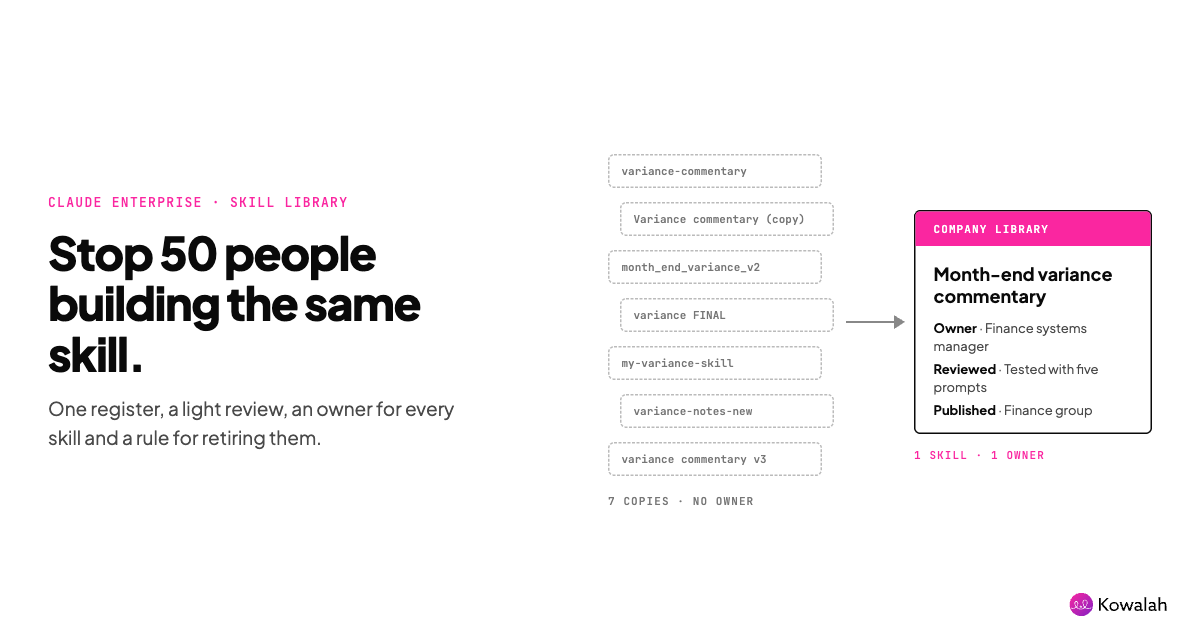
Your people are building skills faster than anyone can track them. Left alone, you get 50 versions of the same one, none of them owned and some of them risky. Fix it with a company skill library: one register, a light review, a named owner for every skill and a rule for retiring them.
This guide is for the AI Ops lead or CIO at a UK organisation of 1,000 to 10,000 people whose Claude rollout has moved from chat to shared workflows. To run it, copy the free AI skill library register. It's ungated, with a Google Doc version.
Why it matters now
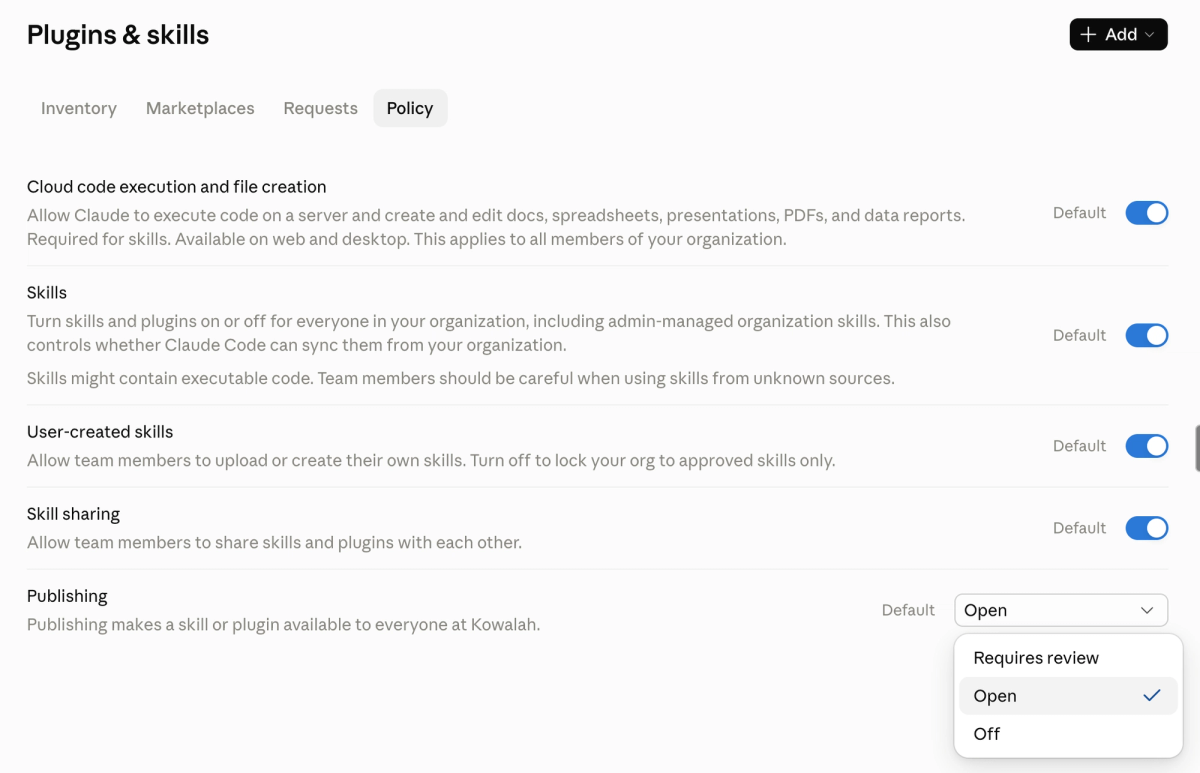
On 2 October, Claude Enterprise organisations that hadn't chosen a publishing setting moved to "Requires review". Anyone can now submit a skill to the organisation library, and an owner, or someone whose role can manage libraries, has to approve it. Skill and plugin security scanning also switched on by default for Enterprise organisations that hadn't set it.
So the review queue exists whether you planned for it or not. Someone has to decide what goes in.
We hear the same problem from clients in different forms. One manufacturer we work with routes every skill and agent change through a single person, and knows it won't scale. A software company asked how to roll back a skill when a change goes wrong. And practitioners on X are still copy-pasting the same skill into every project.
What a skill library is, and isn't
A skill packages a repeatable piece of work, such as month-end variance commentary or a bid review, so Claude does it the same way every time. A company skill library is the approved, shared set: the skills your organisation stands behind, each with an owner.
It isn't a folder of everyone's experiments. Personal skills stay personal. The library holds the ones other people rely on.
What Claude already gives you
Claude's admin settings cover more of the mechanics than most teams realise. On Team and Enterprise plans, owners find them under Organization settings > Plugins & skills:
- Inventory lists every approved skill and plugin, with version history and who gets each one.
- Requests holds submissions for review, with each item's scan result, every file, what changed since the last version and a "Possible duplicate" tag where it looks like something you already have.
- Publishing can be Open, Requires review or Off. With review on, you approve a fixed version, and every later version goes through review too.
- Ownership sits with the organisation. Published skills stay in the library when their author leaves.
- Groups keep libraries focused. On Enterprise, bundle skills into a plugin and assign it to a group, so finance gets finance skills and nobody else does.
Usage analytics show each skill's number of uses and cost per use. Sharing events land in the audit log and Compliance API, though the skill's contents don't.
What the settings don't give you is the operating rhythm: what's worth publishing, who reviews, how you test and when a skill retires. That's the job.
Five rules for a library that stays useful
- Every skill has one named owner. A team or a person who keeps it current. No owner, no publication.
- Authors never review their own skills. Claude won't let you approve your own submission, and Anthropic's guidance for enterprise admins recommends separating authors from reviewers.
- Test before you publish. Anthropic suggests three to five test prompts per skill: when it should trigger, when it shouldn't and an ambiguous case. Check it doesn't steal triggers from skills you already have.
- Merge, don't multiply. When a duplicate turns up, keep the better one, fold in anything good from the other, credit both authors and retire the spare.
- Retire on purpose. Review usage monthly. A skill with no uses in 90 days, an owner who's left or a process that's changed gets updated or retired.
Run it in four steps
1. Intake
Ask submitters six questions: what work it does, who it's for, what it touches (connectors, files or scripts), how they tested it, who'll own it and whether it overlaps an existing skill. The register has them ready to paste into the submission note.
2. Review
Use two lenses. Security first: scripts, network calls, hard-coded credentials and references to other tools are the high-risk signs in Anthropic's review checklist. Scanning helps, but Anthropic says it complements a review rather than replacing it. Then quality: does the skill trigger when it should, follow its own steps and produce work a process owner would sign off?
3. Publish
Decide how it's offered: available to install, installed by default or required. Default to "available" unless a whole group needs it. Scope specialist skills to the group that uses them.
4. Look after it
Once a month, check uses, cost per use and feedback. Update what's drifting. Retire what nobody uses. When a skill changes how a process runs, record it as an outcome, with a baseline and a result.
Worked example: Pemberton Supply
Pemberton Supply is a fictional UK distributor with 2,400 staff, six months into Claude Enterprise.
The AI Ops lead, Priya, pulls the inventory and finds 31 skills shared between colleagues. Seven are versions of the same month-end variance commentary. Two call a finance connector with write access. None has a named owner.
She sets publishing to "Requires review", names two reviewers from outside her own team and asks finance to pick one variance skill. The finance systems manager takes ownership of the winner, folds in two good prompts from the others and runs five test prompts. It's published to the finance group, installed by default.
Six weeks later, the register shows 12 published skills, each with an owner, and five retired. The variance skill is the most used. Finance records the outcome: first-draft commentary now takes about two hours a month instead of a day, measured against the previous quarter's timesheets.
Priya's next build list comes from the backlog, scored with ICE: impact, confidence and ease, each out of 10, multiplied. A bid review skill for sales scores 7 × 8 × 6 = 336 and goes first.
Claude holds the skills; your library holds the map
Claude's organisation library holds what you've provisioned: approved skills and plugins, assigned to the groups that get them. It's the right place to run them. It can't tell someone in sales that finance already has a variance skill, or that the answer is a prompt pack, an app or a training module.
So keep a map beside it. A Kowalah Accelerator library catalogues skills, plugins, prompts, apps, guides and training in one place, including things a person can't reach in Claude yet. Each entry says how to get it, how to use it and what it can read or do. Your AI register records who owns each skill, plugin and agent, and whether it's personal, team or company-wide, so people know who to ask for access.
The Kowalah plugin for Claude does the logging from inside the work:
- Register what you've built. Run /my-ai-tools and Claude lists the skills, plugins, connectors and projects your session uses. You choose what to share. It records names and IDs only, never a skill's contents. An optional second pass notes what each one is for and which process step it serves.
- Log a use case. /spot-opportunities talks through your own work to find the friction. /raise-opportunity scores the idea with ICE and adds it to your opportunity backlog.
- Find what exists, mid-task. Ask "have we done this before?" and Claude searches your organisation's accelerators and Kowalah's library before you start building. Each result says how to get and use it on your AI platform, and what it can access.
To try it, add Kowalah from Customize > Plugins > Discover, connect it with your work email and run /kowalah-setup. On Claude Team and Enterprise, your workspace owner makes it available first. Recording your tools is free; the full Kowalah library comes with the Business plan.
Where Kowalah fits
We're a UK Anthropic Implementation Specialist. We help AI Ops leads set up the library, run the first review cycle and turn the best skills into measured outcomes. If you'd rather keep track yourself, Kowalah's free plan lets you record your skills, plugins and agents in your organisation's AI register.
Common questions
What's the difference between sharing a skill and publishing it?
Sharing sends a skill to specific colleagues or a group. Publishing puts it in the organisation library for everyone to find, and with "Requires review" an owner approves it first.
Who can approve skills in Claude Enterprise?
Owners, and anyone whose role has Libraries set to "Can manage". Nobody can approve their own submission.
Does security scanning replace a review?
No. Scanning looks for skills built to misuse their access. It won't catch a skill that's simply wrong, and it doesn't check skills that were already in your organisation when scanning switched on.
What happens to a skill when its author leaves?
Published skills belong to the organisation and stay in the library. That's a good reason to publish anything other people rely on, rather than leave it shared from one person's account.
How many skills should we publish?
Fewer than you think. Anthropic warns that with too many skills loaded at once, Claude may pick the wrong one or miss the right one. Start narrow, test and consolidate only when a combined skill performs as well.
Get the register
Copy the free AI skill library register. No forms, no gating. If you'd like help setting up your library and review cycle, we're happy to talk it through.
Enjoyed this?
Weekly insights for executives navigating enterprise AI. A five-minute read.