Insights
How to operationalise an MCP-first product
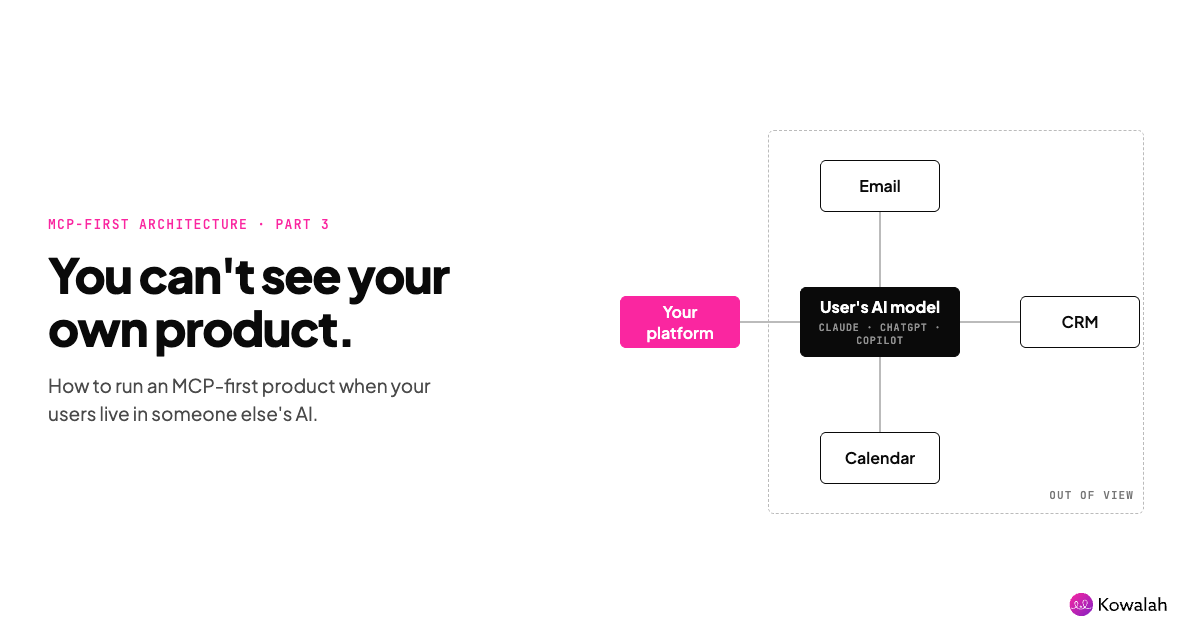
This is article number three in our series on building an MCP-first product:
- Why you should build an MCP-first product
- How to design an MCP-first product
- How to operationalise an MCP-first product - this article
In the first article we looked at what an MCP-first product is - read the article for the full detail but in three bullet points:
- An MCP-first product assumes the user's primary entry point will be their own AI tool or agent - Claude, ChatGPT, Grok Bot, Muse etc.
- An MCP-first product moves the cost of inference from you to your user
- An MCP-first product can solve the cold start problem to launch new products
In this article I'll walk through some of the trade-offs and our lessons learned in running an MCP-first product.
You cannot see your own product being used
With a typical SaaS platform an entire ecosystem of tracking and analytics products exists - PostHog, Amplitude, Mixpanel sit on your platform tracking page views, click paths, funnels, A/B tests and more - there is an entire industry around optimising user journeys with data.
But with an MCP-first product we don't control the screen real estate - the user is in their own AI tool or agent.
It's not all bad news though - through your MCP connector we can capture some useful data:
- Who: all users authenticate through OAuth so we know who they are (and by association their company and any other user related data you hold in your platform)
- Which client: by this we mean which AI tool they are using so we can tell whether they are using Claude, or ChatGPT, or Cursor.
- Which tool was called: we can see the tool name, what arguments were passed to it, the size of the response, any latency, or errors.
- The sequence: we can group calls within a session so you can reconstruct the journey - this can be useful for optimising your tool architecture.
- Absence: which tools were never called (or rarely), which tool calls generated empty results, which users authenticated once and never came back?
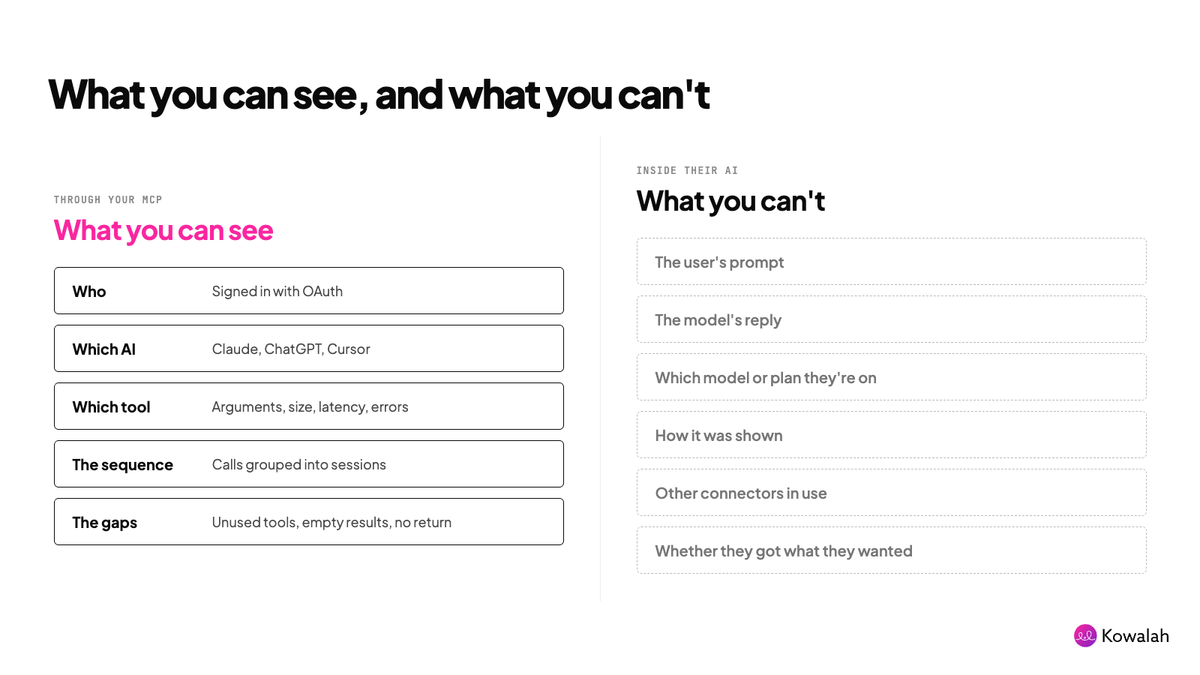
What you can't see (and you probably were hoping for):
- The user's prompt or anything the user said to their model
- The model's reply to the user (ie what did it do with your tool results)
- Which model, thinking level, or subscription plan they are on
- How it was rendered (chat, visualisation, an artifact, voice, mobile)
- Which other connectors they had switched on
- Whether the user got what they wanted
There are some products springing up that support passing some of this additional context over - but generally the terms of service from both Anthropic and OpenAI forbid this:
- Anthropic: "must not collect extraneous conversation data, even for logging purposes"
It's also worth noting that as your MCP-first product goes through security review with Enterprise clients they will drill into what data flows from them to you - any additional data point beyond what is necessary to deliver your product will slow down your approvals.
Plan for the agent, not just the human
In the first article we said your users would reach you in two ways: through their own AI tool, or through their agent.
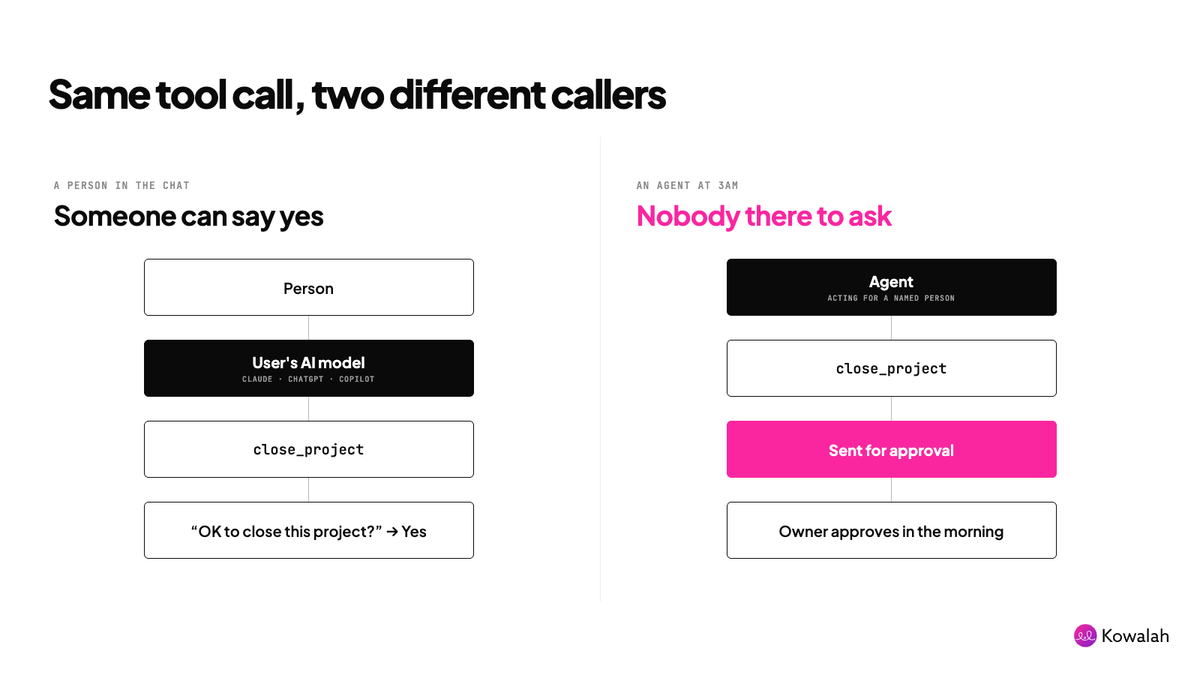
When an agent calls your tools at 3am on someone's behalf, your enterprise customers will ask: whose action was that, and who allowed it?
Some things to put in place:
Know who's calling. Make it clear in your logs whether a call came from a person in a chat or an agent working alone. At Kowalah, agents connect with their own tokens, so we can always tell the two apart.
Tie every agent to a person. An agent acts for someone, and it should never be able to do more than that person could. Start agents on the smallest set of permissions that gets the job done, usually read-only.
Decide what still needs a human. The confirmation loop from the second article assumes someone is there to say yes. For an agent, route anything destructive or commercial to a person to approve. It's the same idea as turning a refusal into a proposal: the agent doesn't get "no", it gets "sent for approval".
Regain (some) control
With a SaaS platform you own every pixel. With an MCP-first product, the user's AI decides what your product looks like. One user gets a paragraph, another a table, another a voice answer in the car.
Your brand disappears. Bar your logo showing as the connector is used, you lose the look and feel.
You can win some of it back:
Guide users to create their UI: while the user is in charge, you can point them in the right direction - helping them to create an artifact (in Claude), or Site (in ChatGPT) that visualises the data from your platform (and other connectors).
At Kowalah we provide users with a sample prompt, and a skill within the plugin, that guides their AI in how to create a visual representation.
Serve your own UI via MCP Apps: if your product really does have strong imagery - hotel photos, or building architecture, then with the MCP Apps extension you can serve this up within the user's AI tool.
Check out the connectors from Booking.com or Canva to see this in action.
Design the data, not the pixels: you can't control the screen but you can control what arrives on it. Your tool descriptions can coach the user's AI model in how to display the results - "show open actions as a table, most urgent first". Of course it depends on what the user has asked their model for - but we can at least help them.
Evals replace tests
In a SaaS platform tests are developed to ensure a deterministic platform meets the needs of the user stories being developed.
AI models are probabilistic - and so we develop evals (evaluations) where we run sample requests through a grader model - and measure the number of responses that pass our acceptable rate.
You will want to run an eval approach against your MCP - to understand, against varying models and varying levels of thinking:
- Does your MCP get triggered when you'd expect it to
- Does the AI model call the right tools in the right order
- Does the MCP serve up the right context back to the model
- Does the model know what to do with the context your MCP server returns
- Does the user get the outcome they were looking for
To be clear - this is you running sample prompts against your MCP - as we covered earlier - you don't have access to what your actual users are asking.
You can redirect your user research team to go and spend time with your actual users and spend time watching them, or asking them to show you past conversations, so that you can populate your sample prompt set.
Other items to note down in user research - what connectors they have enabled, what plugins and skills they have turned on, what artefacts they have created - these can all be modelled in your evals.
We'll dive into evals in detail in another article - but you'll be looking for:
- Triggered: the model used your tools at all, rather than answering from memory.
- Right tool, right arguments: it picked the correct tool and passed sensible inputs, like the right organisation or process.
- Right information back: the response contained what the task needed, and not far more.
- Right final answer: the model explained your data correctly to the user.
- Efficient: it got there in a reasonable number of calls without errors or retries.
- Stayed safe: no writes without confirmation, no data from outside the user's organisation.
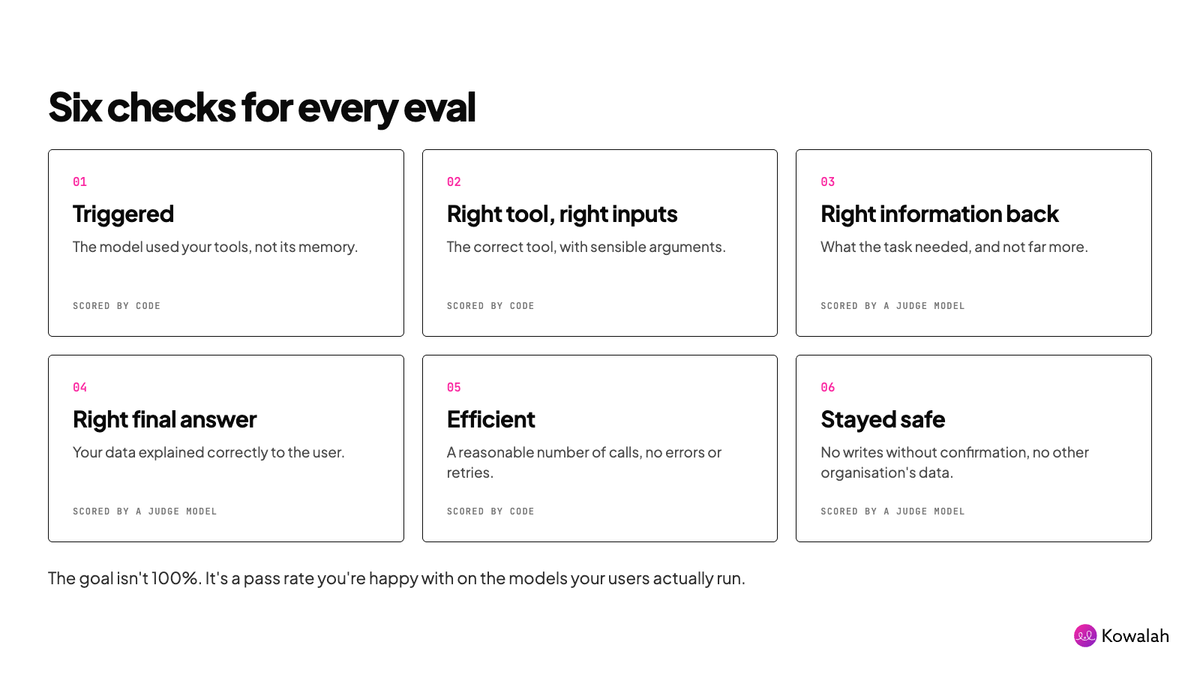
A quick point on evals - the goal is not 100% (as it is with tests). The goal is a pass rate that you're happy with on the typical models your users are running - depending on use case that might be 90% on a smaller model and higher on a frontier model.
Support your user where they are
On a SaaS platform help sits right next to the product - you might have a help widget, a tooltip, or a support link that the user can easily get to.
In an MCP-first product none of that is available so you once again have to put yourself in your user's shoes.
Something's not working - what are they going to do? Ask AI!
"Hey Claude, why isn't Kowalah showing me the operating model?"
There are a couple of ways you can support the AI (and your user):
Give the model access to help content (as tools or resources):
- Tools: create a get_help_documentation tool which pulls in documentation from your help suite
- Resources: another property of an MCP server is to serve files directly - a resource that provides the model with detailed documentation of how your MCP-first product works can be useful.
Note: this is different to the tool descriptions explaining to the model how your tools work, your documentation would be around user admin, billing, access - all the other things a user might be struggling with.
The other suggestion is a tool that helps the user log a support ticket to speak to a human - log_support_ticket for example - the model could pass the user details, their problem, and with their permission contact details, to get your own support agent (AI or human) to help them out.
Wrapping up
In this article we've looked at how to run an MCP-first product:
- Use what you can see, and accept what you can't
- Win back some control over how your product appears
- Replace tests with evals
- Support your user inside their own AI
- Plan for the agent, not just the human
That also wraps up the series. We've covered why you'd build MCP-first, how to design it, and how to run it once it's live.
If you take one question into your next roadmap meeting, make it this: can a user do this entirely in conversation, and if not, is that deliberate?
MCP-first isn't MCP-only. Some things will always belong on a screen. Your job is to decide which ones, rather than defaulting to a screen because that's how software has always been built.
Go deeper
The full series:
- Why should you build an MCP-first product?
- How to design an MCP-first product
- How to operationalise an MCP-first product (this article)
To see an MCP-first product in action, connect the Kowalah MCP to Claude or ChatGPT and start mapping your processes at kowalah.com.
More places to look
- Writing effective tools for agents (Anthropic): tool design and evals, straight from the people building the models
- Demystifying evals for AI agents (Anthropic): a practical starting point for your eval set
- MCP Apps (MCP blog): how to serve your own UI inside Claude and ChatGPT
- Anthropic Software Directory Policy and OpenAI app guidelines: what you can and can't collect, worth reading before your first security review
- Model Context Protocol: the specification itself
———-
As background I'm Charlie, the CEO of Kowalah, we build agents and AI-native workflows for Enterprises.
If you're considering building AI products for your internal teams or customers, our Kowalahs would love to learn more about your current processes - or you can start MCP-first at kowalah.com
Enjoyed this?
Weekly insights for executives navigating enterprise AI. A five-minute read.