Insights
WebMCP: let agents talk to your website
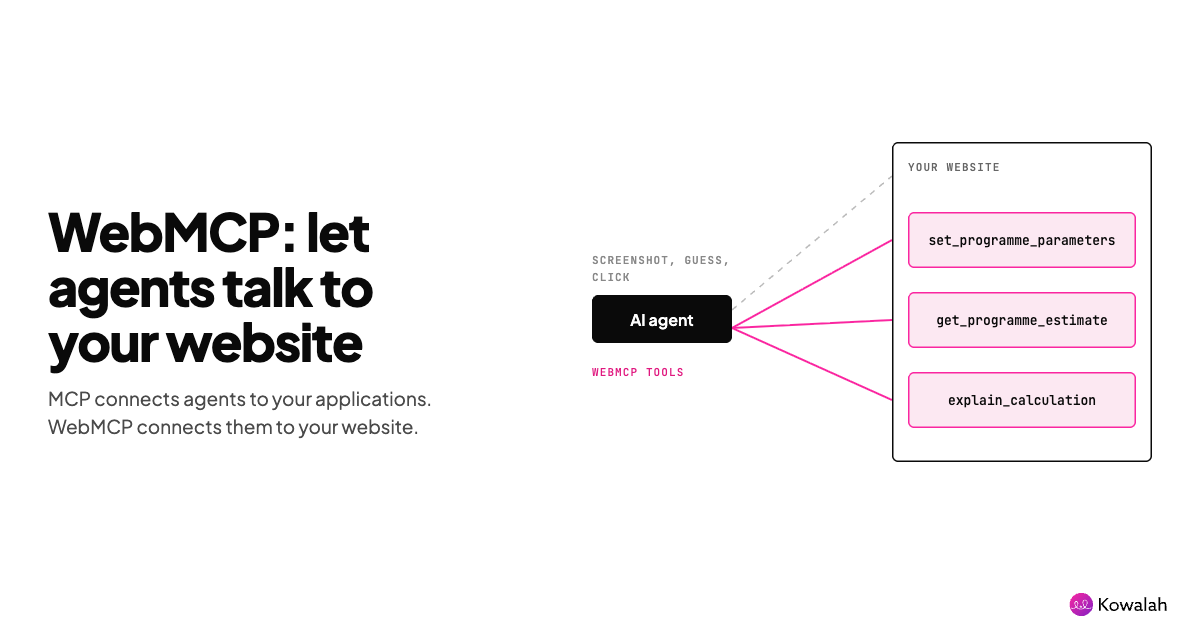
WebMCP is a proposed standard jointly developed by teams from Microsoft and Google.
It is inspired by the Model Context Protocol, the standard created by Anthropic that allows LLMs (models such as Claude, ChatGPT and Gemini) to interact with other applications.
Whilst WebMCP is still in its early stages, it is worth thinking about your own website and understanding if and how it could be valuable to you.
Why think about it now? In the last week of September, three labs shipped always-on AI agents: OpenAI's dots, Microsoft's Copilot Autopilot and xAI's Team Bots. Agents that work on someone's behalf all day will use websites, and they will get on far better with the ones that hand them tools.
In this article I'll:
- Quickly remind you what MCP is
- Explain how WebMCP is different
- Give you some questions to think through about your own web presence
This article will be most valuable if human visitors to your website today have to 'do something' there.
Think of a traveller booking a holiday, an applicant for financial services filling in a multi-step form, a patient working through a self-diagnosis, or a candidate applying for a job.
If you just have a marketing site with a contact form, WebMCP will have limited impact.
What is MCP? A quick reminder
Model Context Protocol: the clue is in the name, so let's work through it in order.
- Model: any large language model, such as ChatGPT, Claude or Gemini.
- Context: for models to work well they need context from other systems. If you ask your AI model what your sales forecast will be this quarter, it needs access to your other systems to give an accurate answer.
- Protocol: a standard that many vendors sign up to, to make it easier to work together. SMTP determines how email flows, HTTP determines how web traffic flows, and MCP determines how models communicate with other systems.
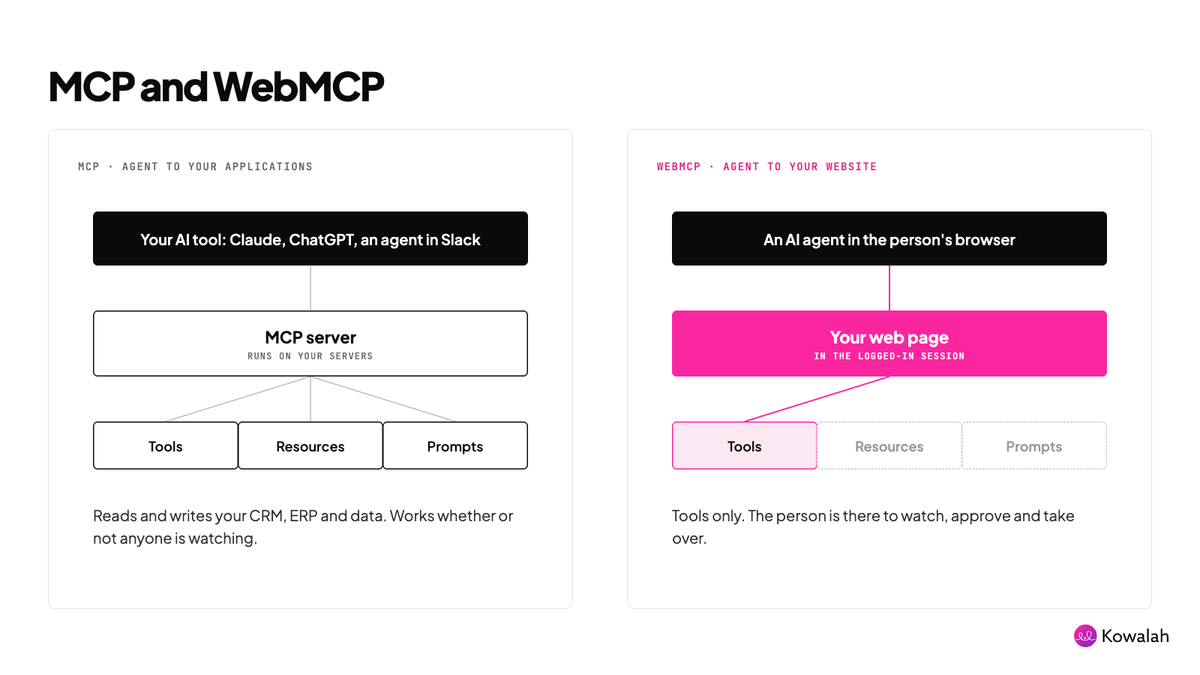
So MCP allows models to gather context from other applications in a standardised way, and you can use the same MCP server whichever model you are using.
Traditional MCP has two main pieces:
- MCP host: the interface your users are in. It could be ChatGPT, Claude or an agent in Slack.
- MCP server: this determines what the MCP host can see and do. Today it can deliver three things to the model:
- Tools: the MCP client can find and use tools to read from (and sometimes write to) other systems, such as CRM, ERP, data warehouses and other SaaS platforms.
- Resources: documentation and files served up directly, such as a Google Doc or a database record.
- Prompts: predefined prompts that guide the user to commonly asked questions and tasks.
Within your preferred AI tool, any "connector" or "plugin" is using an MCP server to work.
What is WebMCP?
Now you're up to speed with MCP, how is WebMCP different?
If MCP enables LLMs to speak to your applications, WebMCP allows LLMs to speak to your website.
Today an agent works your website the way a human does, badly. It reads the page (the pixels, the DOM, the accessibility tree), sends what it sees to the model, decides what to do next, calculates where it thinks a button or field sits, clicks or types, then reads the page again and repeats.
It is slow and inaccurate, and it relies on websites being designed simply enough for the agent to 'click around'.
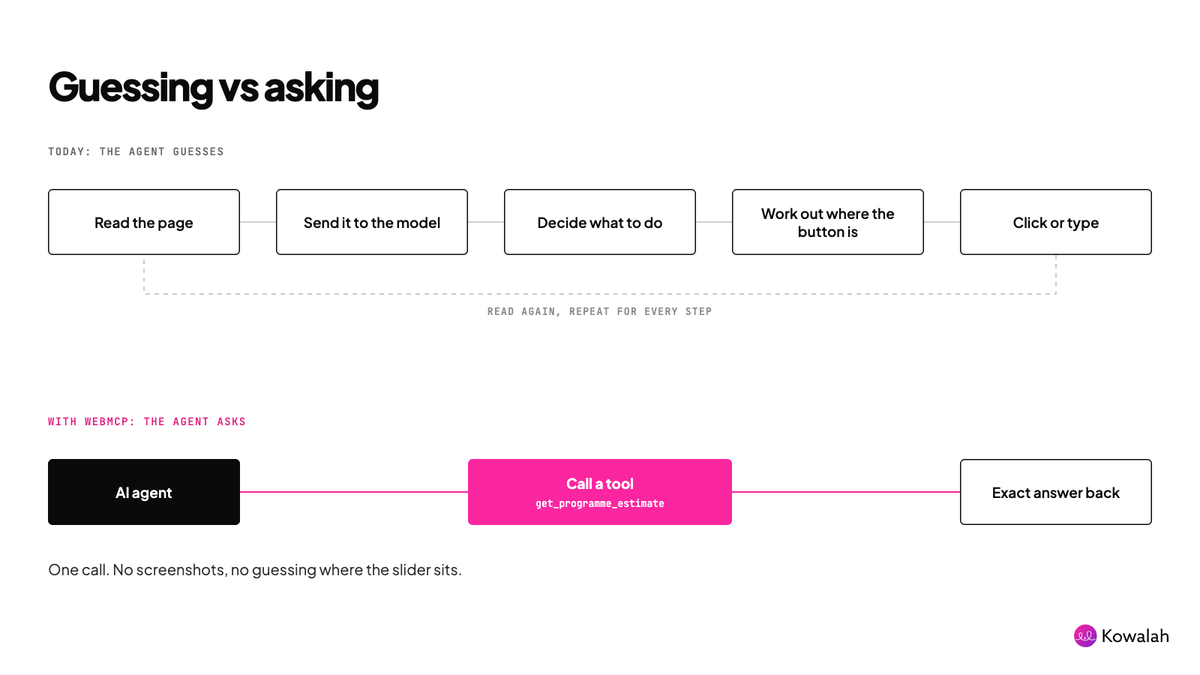
WebMCP takes only the tools element of traditional MCP (no resources or prompts) and exposes those tools to agents browsing your website.
Here's an example you can test yourself.
On the Kowalah website we have an AI Programme Cost Calculator. It is designed to help executive teams plan their AI programme and understand all of its different elements.
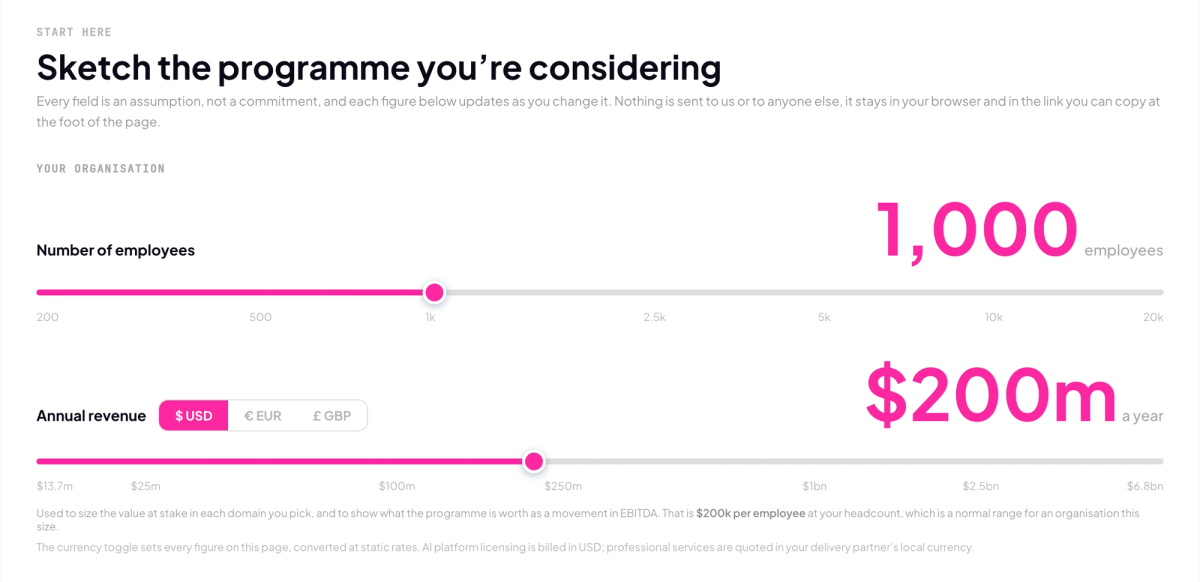
It includes a number of toggles and inputs that drive the calculations and produce the output.
Using WebMCP we have added three tools to the page:
set_programme_parameters: guides the agent through which parameters exist, how to understand them and how to set them programmatically (for example, we have some sliders, some multi-select boxes and some input boxes).get_programme_estimate: gives the agent the calculator's results directly, without it having to take screenshots.explain_calculation: tells the agent how the numbers were derived, so the model doesn't need to guess or infer.
Our example is a simple one, but you can see how the concept could work for a more complex use case: a form that spans several pages, has decision trees, or needs information pulled from several sources.
It isn't only demos
On 28 September, Shopify began rolling out three WebMCP checkout tools to eligible merchants: get_checkout, update_checkout and complete_checkout. A browser-based agent can now read a store's checkout, update it and submit the order with the buyer's authorisation, without screenshotting a single button.
Notice the pattern. Like our calculator, Shopify exposed three tools that map to what the person is trying to do: see it, change it, finish it.
Where WebMCP stands (30 September 2026)
WebMCP is a W3C Community Group draft, co-edited by Google and Microsoft. It is not yet on the formal standards track.
- ChatGPT: the desktop app's built-in browser has supported WebMCP site tools since 27 August. This is the easiest way to try it today. It needs a GPT-5.6 Sol or Terra model and isn't available in Enterprise or Edu workspaces.
- Chrome: in an origin trial (versions 149 to 156), and testable behind a flag.
- Edge: experimental, behind a flag.
- Gemini: Google says Gemini in Chrome will support WebMCP "soon". No date yet.
- Claude: not yet. Claude in Chrome still reads the page and clicks.
The front door versus the back door
I think of WebMCP as the front door, compared with the back door, where you expose a remote MCP server or an API.
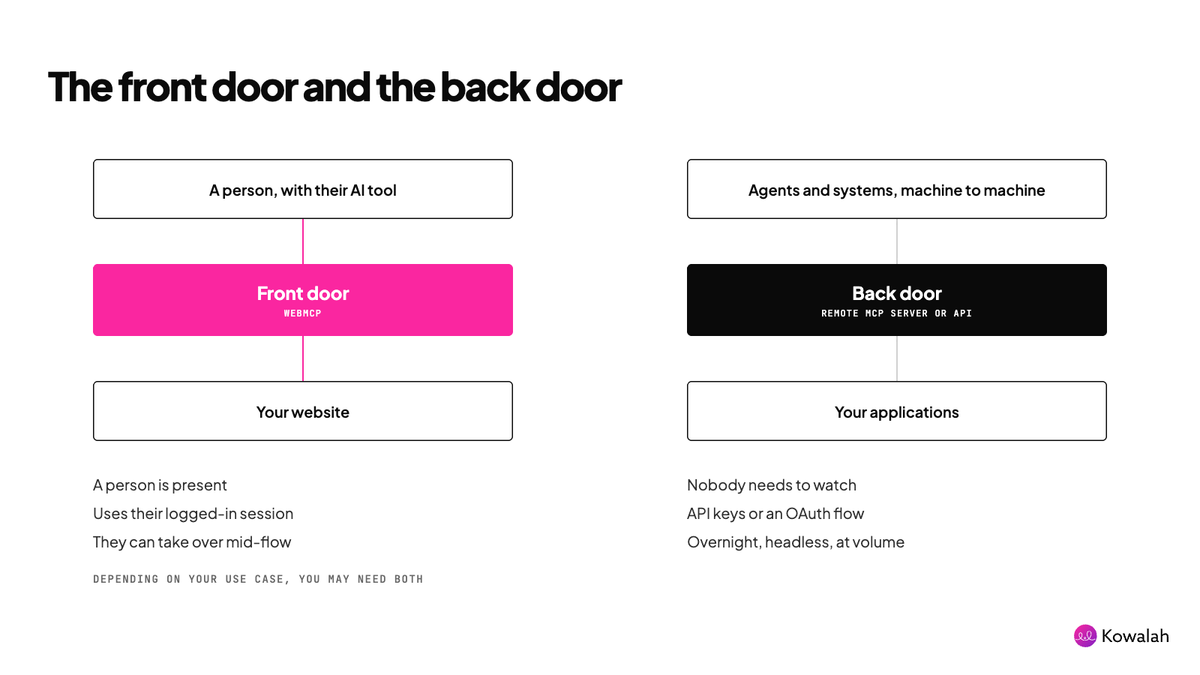
When should you consider the front door?
The user's session comes free. WebMCP tools run inside the browser the person is already logged into. No OAuth flow to build, no API keys to issue, no rate-limit infrastructure, no separate API surface to version and maintain.
A human can take over mid-flow. The agent works on the same page the person is looking at. They watch the form fill in, disagree with an answer, and finish it themselves. No back door gives you that.
When should you pull back from the front door?
WebMCP needs a live browser session with a human in the loop. No headless operation, no server-to-server, no overnight batch. Front door means a person is present. Back door means machine-to-machine at volume.
Depending on your use case, you may need both.
What stops an agent doing something it shouldn't?
Three things, and your website controls the first.
- You choose the tools. An agent can only call the tools you register. If you don't expose "delete account", there is no WebMCP path to it.
- The agent acts as the person. Tools run in the person's own logged-in session, with their permissions, not a super-user key.
- The browser asks first. ChatGPT asks permission before it uses a site's tools, and confirms sensitive actions such as purchases, deleting data or sending messages. It also shows whether each tool only reads or can change data.
So design every tool as read or change, and keep anything irreversible behind a confirmation the person sees.
Questions to ask of your own website
As you consider whether WebMCP could be valuable on your own website, here are some questions to ask.
- Do we have existing flows on our website that people work through (booking, applications, purchasing, support, hiring)?
- Can we imagine people using these flows through their preferred AI tools?
- If we don't have existing flows, which processes do we currently make people call or email about that could be handled on the web?
- When would it make sense to give agents access through the front door (WebMCP) instead of the back door (an MCP server)?
- What common actions or intents might an agent have that we should expose through WebMCP?
- What other context might an agent have, through the person's AI tool, that could complement our WebMCP tools?
- How will we tell customers and prospects about the new ways of working with our website?
- How will we measure the success of our WebMCP tools? Can we generate agent analytics?
- How do we help agents find us?
- Who will design and maintain the new WebMCP tools: engineers or marketing?
- Will our own security defences block this kind of traffic? Do we want them to?
Try it out
In the ChatGPT desktop app, visit the Kowalah cost calculator and ask it to work with the page.
Enjoyed this?
Weekly insights for executives navigating enterprise AI. A five-minute read.