Insights
What the 4 November skill publishing switch means for your Claude Enterprise rollout
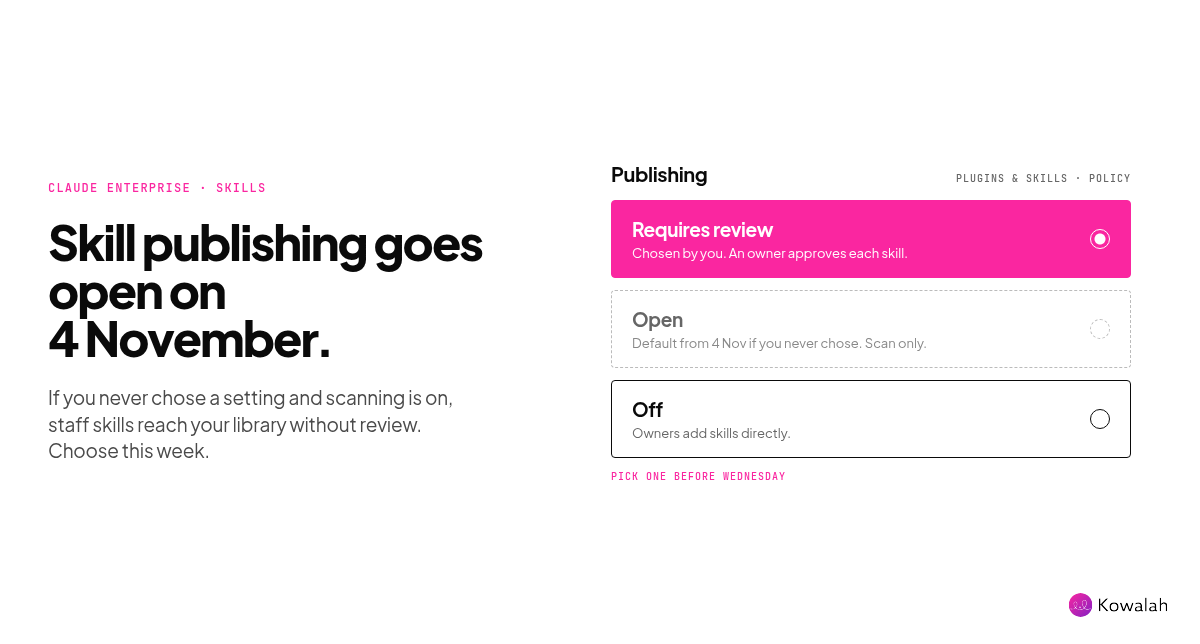
From Wednesday 4 November, some Claude Enterprise organisations will publish staff-built skills to the company library without anyone approving them. If you run skill and plugin security scanning and never chose a publishing setting, yours is one of them. Spend ten minutes this week choosing on purpose: keep review, go open with limits, or switch publishing off.
This is for AI Ops leads and CIOs at UK organisations of 1,000 to 10,000 people who run Claude Enterprise and are starting to see staff build their own skills.
What changes on 4 November
Anthropic has updated its help article on managing skills. Right now, an Enterprise organisation that hasn't chosen a publishing setting sits on "Requires review": staff can submit a skill or plugin, and an owner approves it before it reaches the organisation library.
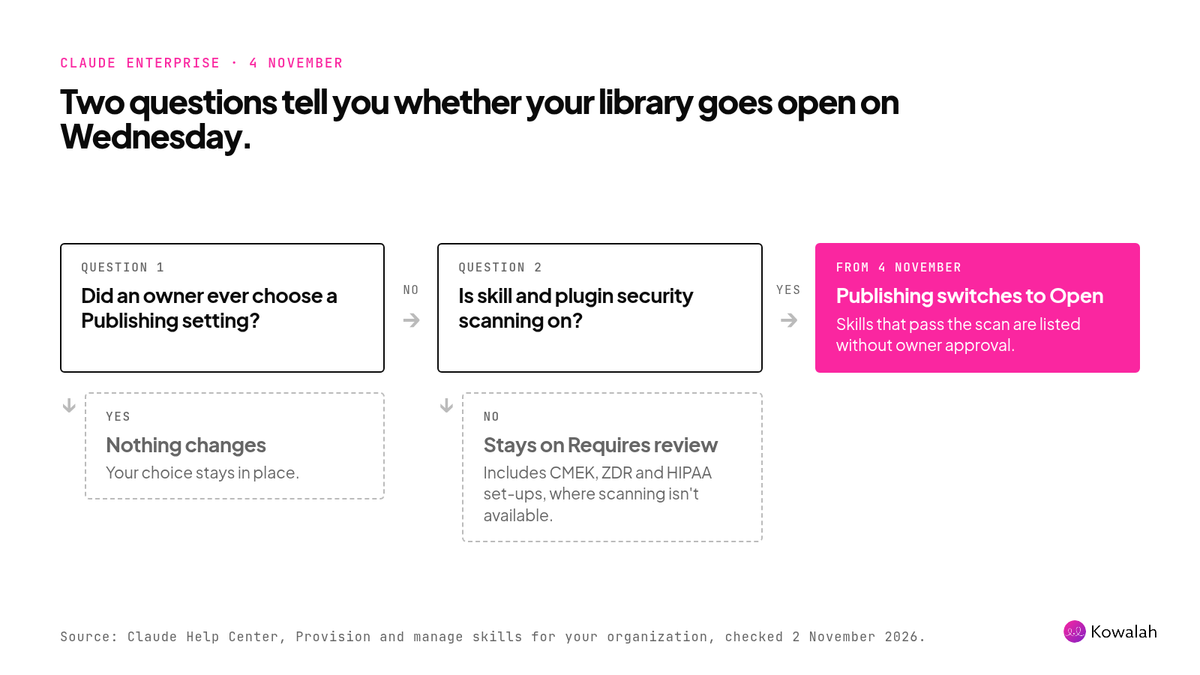
Starting 4 November, that default changes to "Open" for organisations that have skill and plugin security scanning on. Skills and plugins that users publish are listed in the library once they pass the automatic scan, without waiting for owner approval. Anything published is then available to everyone in the organisation to install.
Three details matter:
- Organisations that already chose a setting keep it. The change only touches the default.
- Custom roles still apply. Users whose custom role doesn't allow publishing to the whole organisation still go through review.
- Scanning is often on already. It switched on by default for Enterprise organisations that hadn't chosen a setting before 2 October, so many tenants qualify without anyone having decided anything.
Practitioners noticed. One post on X on 2 November put it plainly: from Wednesday, a skill a colleague submits can appear in your company's library without anyone approving it.
Why this came up this week
Skills are where staff start to standardise their own work. A sales manager can write one in an afternoon, and once it's in the library, colleagues across the organisation can install it.
We hear the same questions in client conversations. One client asked us last week how to roll skills out to existing staff and new joiners. Another wanted a one-page list of which Claude features were still switched off in their tenant, because defaults keep changing under them. A publishing policy is part of both answers.
This is also a reversal of the last default. In October we wrote about running a company skill library after unset organisations moved to "Requires review" on 2 October. A month later, the same organisations are heading to "Open".
What the scan checks, and what it doesn't
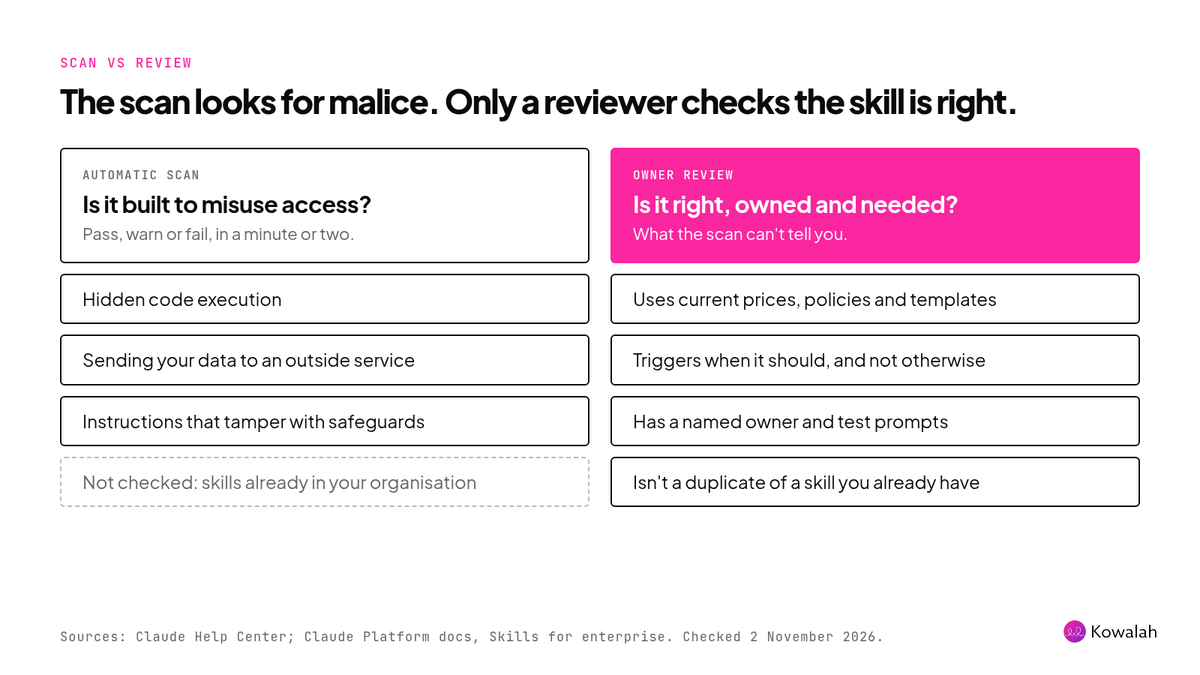
The skill and plugin scan is a genuine safeguard. It looks for skills built to misuse their access: hidden code execution, sending your data to an outside service, and instructions that tamper with Claude's safeguards. Each scan returns pass, warn or fail, usually in a minute or two.
Anthropic is clear about its limits. A pass "isn't a guarantee that a skill is safe in every respect", and the scan won't catch a skill that behaves in ways you didn't intend without being malicious. It also doesn't cover skills that were already in your organisation before scanning was turned on.
So the scan answers one question: is this skill hostile? It can't tell you whether the bid skill quotes last year's day rates, whether the HR skill reflects the policy you changed in September, or whether it's the fourth version of the same month-end commentary skill.
Anthropic's own guidance for enterprise admins says scanning complements, but doesn't replace, a review. It also recommends three to five test prompts per skill and separating authors from reviewers.
Open, review or off: which to choose
All three settings are reasonable. The wrong choice is the one nobody made.
| Requires review | Open | Off | |
|---|---|---|---|
| What happens | Staff submit; an owner approves each skill and each new version | Staff publish straight to the library once the scan passes | No "Publish to org" button; owners add skills directly |
| Who checks quality | A named reviewer | Nobody, unless you check afterwards | Owners, as they add skills |
| Time to reach colleagues | Hours to days, depending on reviewers | Minutes | As fast as owners work |
| Main risk | A queue nobody works | Wrong, stale or duplicate skills reach everyone | Good skills stay stuck in personal accounts |
| Best for | Most organisations in their first year | Mature libraries with trusted authors, limited by custom role | Organisations not ready to staff reviews |
For most UK organisations in their first year of Claude Enterprise, keep "Requires review" and select it yourself before Wednesday. It's the only setting where someone checks that a skill is accurate, owned and needed before hundreds of people can install it.
Choose Open when your library is mature: skills have named owners, authors know the standard, and you check the inventory weekly. Use custom roles to limit who can publish to the whole organisation, so everyone else still goes through review.
Choose Off if you can't staff reviews yet. Owners can still add skills directly, and nothing already published is deleted. The cost is that good skills stay stuck in personal accounts.
What to do before Wednesday
- Check the setting. Go to Organization settings > Plugins & skills, open the "Policy" tab and look under Publishing. If it shows "Requires review" only because nobody chose, select it yourself so the default change passes you by.
- Name the reviewers. Owners can review, and so can anyone whose role has Libraries set to "Can manage". Pick one per department that builds skills. Note that an owner's own submissions publish straight away, so owners who build skills should ask a colleague to check them first.
- Agree a short bar. Every skill needs a named owner, a line on what it touches (connectors, files or scripts), three to five test prompts and a check for overlap. Our free AI skill library register has the intake questions ready to paste into a submission note.
- If you go Open, add limits. Restrict org-wide publishing by custom role, review the Inventory tab weekly, and agree who removes a skill that turns out to be wrong.
- Tell people. A two-line note to staff, and to new joiners as part of their onboarding, on how to submit a skill and who reviews it saves a lot of "why isn't mine in the library?"
Defaults like this will keep arriving. Our Claude Enterprise release review covers a simple monthly routine for catching them before they reach your people.
Where Kowalah fits
Claude's library holds the skills you've approved. It doesn't tell someone in sales that finance already built the skill they need, or which process step a skill serves. The Kowalah plugin for Claude helps here: run /my-ai-tools and it lists the skills, plugins and connectors your session uses, records names and IDs only, never a skill's contents, and adds them to your organisation's AI register. Recording your skills, plugins and agents in Kowalah is free.
Frequently asked questions
Does the 4 November change affect Claude Team plans?
No. On Team plans, Publishing already starts as "Open", unless Share with organization was turned off, in which case it starts as "Off".
What happens to skills we've already published?
Nothing. Published items stay in the library until an owner removes them, whichever setting you choose. Organisations that already picked a setting keep it.
Can we let some people publish without review?
Yes, on Enterprise. Set Publishing to "Open" and use custom roles: users whose role doesn't allow publishing to the whole organisation still go through review.
Does a passed security scan mean a skill is safe to use?
It means the scan found no sign of malicious content. It doesn't check that the skill is accurate, current or tested, and it doesn't replace a review.
Who can approve skills in Claude Enterprise?
Owners, and anyone whose custom role has Libraries set to "Can manage". Reviewers see the scan result, every file, what changed since the last version, and a "Possible duplicate" tag where a submission looks like something you already have.
Next step
Check your Publishing setting today and choose it deliberately. If you'd like a second pair of eyes on your skill library, your review cycle or the next default change, Kowalah is a UK Anthropic Implementation Specialist and we're happy to talk it through.
Enjoyed this?
Weekly insights for executives navigating enterprise AI. A five-minute read.