Insights
What the 16 November Cowork switch-on means for your Claude Enterprise rollout
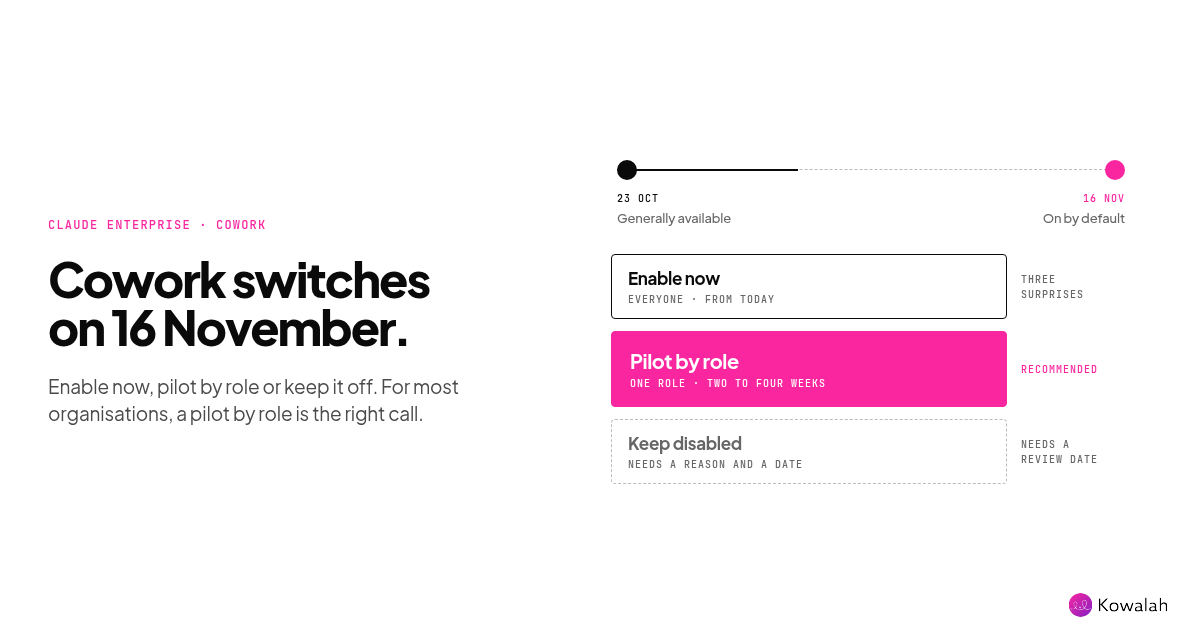
Claude Enterprise organisations get a new default on 16 November. Chat and Cowork become one Claude, and agentic work runs in Anthropic's cloud for everyone with a standard role, unless an owner decides otherwise first. You have three weeks to choose: enable now, pilot by role, or keep it off. For most organisations, a pilot by role is the right call.
This analysis is for CIOs and AI Ops leads at UK organisations of 1,000 to 10,000 people who run Claude Enterprise. To plan your own pilot, copy the free Claude Enterprise Cowork Pilot Plan. It's ungated, with a Google Doc version.
What Anthropic announced
On 23 October, Anthropic made the unified Claude experience generally available for Claude Enterprise. Pro and Max plans got it in September.
- One conversation, two modes. Every conversation starts as a chat. When a task needs to run code or work with files, Claude carries on in an isolated cloud sandbox and returns the finished document, analysis or deck.
- Work keeps going. Because it runs in the cloud, the task continues after someone closes their laptop. They can pick it up on web, desktop or mobile.
- Nothing to rebuild. Chats, projects, connectors, skills and plugins carry over, Anthropic says.
- New cost controls. A new Efficient mode, model entitlements by role, spend limits and pooled group budgets.
The date that matters
The detail admins need is in the admin setup guide. The setting is called Chat and Cowork unified. It's off by default in existing organisations, and it turns on by default on 16 November 2026.
- Owners and Primary Owners see "Will be automatically enabled on November 16, 2026" under Organization settings, then Capabilities. They can choose Enable now or Keep disabled.
- If you've already turned the setting on or off, that choice stays.
- It needs two capabilities: Chat, and Cloud code execution and file creation. If either is off, nothing turns on. After 16 November, it switches on as soon as both are on.
- Once it's on, everyone with the User, Admin, Owner or Primary Owner role gets it. New custom roles start with all capabilities, so they get it too.
- It isn't available yet for organisations that use zero data retention, the HIPAA-ready configuration or customer-managed encryption keys. They stay as they are.
If nobody owns this decision, the release makes it for you. That's the pattern behind our Claude Enterprise release review, and this is the biggest example yet.
Your three options
| Enable now | Pilot by role | Keep disabled | |
|---|---|---|---|
| Who gets it | Every User, Admin and Owner | A named pilot group, then waves | Nobody, for now |
| Best when | Cowork in the cloud is already reviewed and widely used | Most organisations | Security review hasn't started, or you're on ZDR, HIPAA-ready or CMEK |
| Risk | Spend and retention surprises at scale | Low, if you set limits first | Staff go round you to personal accounts |
| Spend control | Org-wide limits only, unless set up first | Pooled budget and Efficient mode for the pilot | None needed |
| Security review | Must be finished | Scoped to the pilot | Deferred, not done |
| What to do before 16 November | Set roles, limits and settings | Move non-pilot staff to a custom role with it off | Choose Keep disabled and record why |
Anthropic's own recommended rollout matches the middle column: start in a sandbox organisation or a pilot role, check your settings, then monitor usage for two to four weeks before you expand in waves.
Why a pilot beats both extremes
Enable now is fast, but it hides three surprises.
- Spend. Anthropic says pricing stays usage-based, and that agentic work can use more tokens than a quick chat. A team that used to ask questions will now hand over whole tasks. That's the point, but your bill will notice.
- Retention. Your custom retention setting covers conversations and the cloud sessions Claude starts from them. The guide lists what it doesn't cover: Cowork cloud sessions a member starts directly, scheduled tasks and their runs (which keep running after the conversation that created them is deleted), and Cowork history stored on a member's computer.
- Reporting. Once a member has access, their chat and Cowork usage is reported under a new Chat and Cowork unified line. Unless you add that line back in, your chat and Cowork numbers will look like they're falling just as use goes up. The Top connectors and Top skills cards don't include it yet.
Keep disabled feels safe, but it isn't. In conversations with clients this month, we've seen the cost of switching things off. One organisation had memory, artifacts, connectors and Claude Code all disabled, and staff asked what the corporate Claude was for. In another, a head office locked Claude down and a UK team simply opened its own Claude Team account. Our personal Claude vs Claude Enterprise comparison covers why that happens.
Keep disabled is the right answer only when you have a reason and a date to revisit it.
What to do before 16 November
- Make the decision someone's job. Name an owner, usually the AI Ops lead, with the CIO signing it off. Put the date in the steering group update.
- Check your starting point. Is Chat on? Is Cloud code execution and file creation on? Are you on ZDR, HIPAA-ready or CMEK? That tells you whether 16 November affects you at all.
- Map your roles. List who should get the unified experience first. Move everyone else to a custom role with Chat and Cowork unified turned off. If you sync roles through SCIM, you can add people in waves.
- Set spend guardrails first. Turn on Efficient mode for the pilot role if you want to cap cost: it keeps the unified experience on Sonnet and Haiku, and new sessions start on Claude Sonnet 5.5 at low effort. Add a pooled group budget and member-level limits. One client audit we saw this month found that inbox automations made up more than half of its Claude spend. Agentic work makes that kind of drift easier, not harder.
- Review the settings that now matter more. Network egress (off by default for Enterprise), connector policies, "Always allow" for connector tools, the "Skip all approvals" and "Automatically approve" modes, sharing, remote control and scheduled tasks. Each one decides what the agent can do without asking.
- Close the retention gaps. Decide how you'll handle sessions started directly in Cowork and scheduled tasks. If you can't govern scheduled tasks yet, turn them off for now. Tell members that existing memory moves to a new memory system, and that the old memory may be deleted 14 days later.
- Fix your reports. Add the Chat and Cowork unified line to every spend and usage report before the pilot starts. For headcount, use the overall active users figure, since one person can be active in more than one product.
What it means for your programme
The real change isn't a settings page. It's that people can now ask Claude for the finished thing, not a draft to tidy up. That turns a lot of "use Claude more" into "redesign how this work gets done".
So treat the pilot as discovery, not just a technical test.
- Log what people hand over. Each task that comes back as a finished report, analysis or deck is a candidate opportunity. Record it, with who raised it.
- Score it. Use ICE: impact, confidence and ease, each from 1 to 10, multiplied for a score out of 1,000. Back the highest scores first.
- Baseline the process. Before a team relies on the unified experience for a process, note how long it takes today. Two to four weeks later, measure again, and say whether each number is estimated, sampled or measured.
That gives your steering group outcomes, not activity, when you ask to expand.
Common questions
Will 16 November change anything if we do nothing?
Yes, if Chat and Cloud code execution and file creation are both on and you haven't already set Chat and Cowork unified. It will switch on for every User, Admin, Owner and Primary Owner.
Can we turn it off after 16 November?
Yes. The guide says you can turn it off later. Members lose access as soon as the setting or their role changes, because access is checked on every request.
Does Efficient mode stop people using Opus?
In the unified experience, yes. It limits members to Sonnet and Haiku models there. Other products, such as Claude Code, aren't affected.
Do we need a new security review?
Anthropic says most teams review two components they already know, Claude chat and Cowork in the cloud, and that a Cowork in the cloud review already under way carries over. Check with your security team.
Get the pilot plan
Copy the free Claude Enterprise Cowork Pilot Plan. It covers the decision, the role map, settings, retention gaps, spend guardrails, pilot measures, an ICE-scored opportunity log and a message to staff. If you log opportunities and outcomes in Kowalah, that part is free.
Kowalah is a UK Anthropic Implementation Specialist. If you'd like a second pair of eyes on your settings before 16 November, talk to us.
Enjoyed this?
Weekly insights for executives navigating enterprise AI. A five-minute read.