Insights
How we use Granola at Kowalah
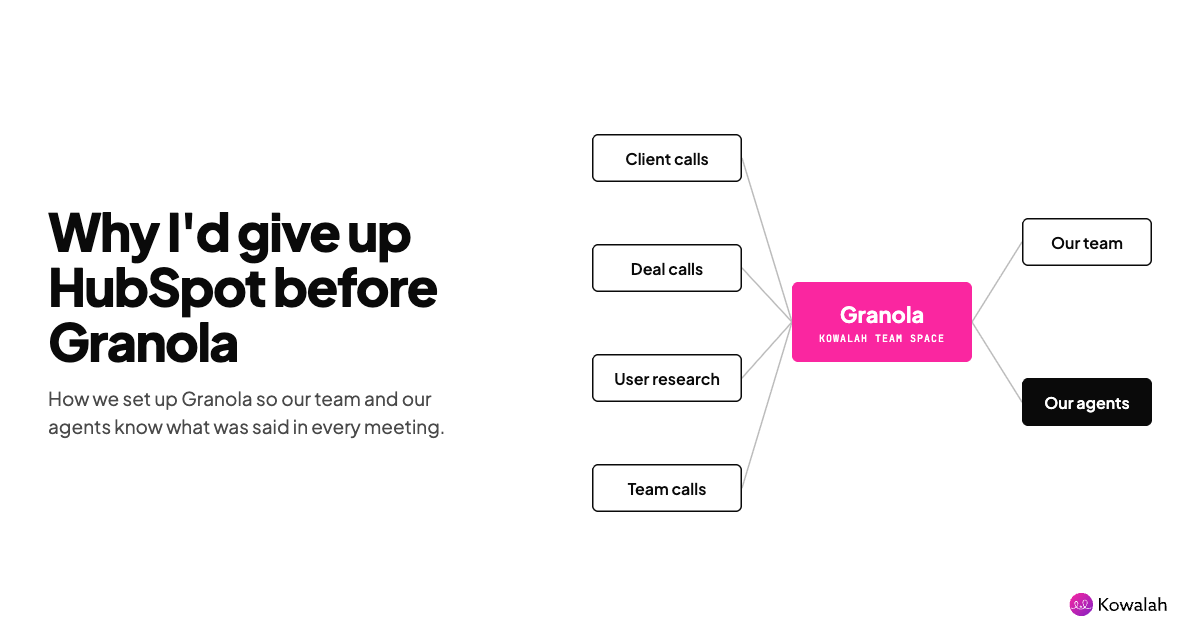
"I'd give up HubSpot before I'd give up Granola," I said to a team of client executives last week.
It was a throwaway comment as I talked about connectors in Claude.
But as I thought about it after the session, I realised I really believed it - the way we have implemented and use Granola has meant it knows more about our business, our clients, our culture and what is about to happen than other systems of record.
Granola powers our team of agents, and that lets us keep growing the business without growing our headcount.
In this article I'll walk through how we've set it up so you can do the same.
What is Granola?
If you aren't aware - Granola is a meeting transcription tool. It transcribes the notes from online meetings in Teams, Zoom, Google Meet, as well as in person meetings via your iPhone.
It does not record the audio or video, just the transcription, which it then converts into one or more AI notes - summaries of the meetings based on templates that you set up.
By default a meeting note is private to the people that were in the meeting, unless an attendee moves the meeting into the company's shared 'space' (keep a note of this - it's important to how we use Granola later).
From a compliance perspective - whilst Granola doesn't inject itself into your meetings as an attendee (resulting in the embarrassing "ooh, let me get rid of my note taker"), it does notify the attendees, and you should always mention that you are transcribing.
If you want more detail and a demo, the Granola team joined a recent Kowalah webinar: watch it here.
How we set up Granola
We give every employee a Granola account, and it is an expectation that you Granola every internal and external meeting.
Granola handles this automatically giving you a nice pop up one minute before to start your meeting and start Granola-ing - I've not heard anyone in the team push back on it, or a client saying I don't want you to take notes.
On this point - when I am on the client side I explicitly WANT you to transcribe. If I am going to take the time to walk you through my process, what my objectives are and who's involved - I want you to have more than a doodle you scrawled in your book.
We have set up predefined templates for common meetings with defined agendas - project launch workshops, discovery meetings, status meetings.
These templates ensure the AI notes follow a consistent approach and pull out the details we'll want to review later.
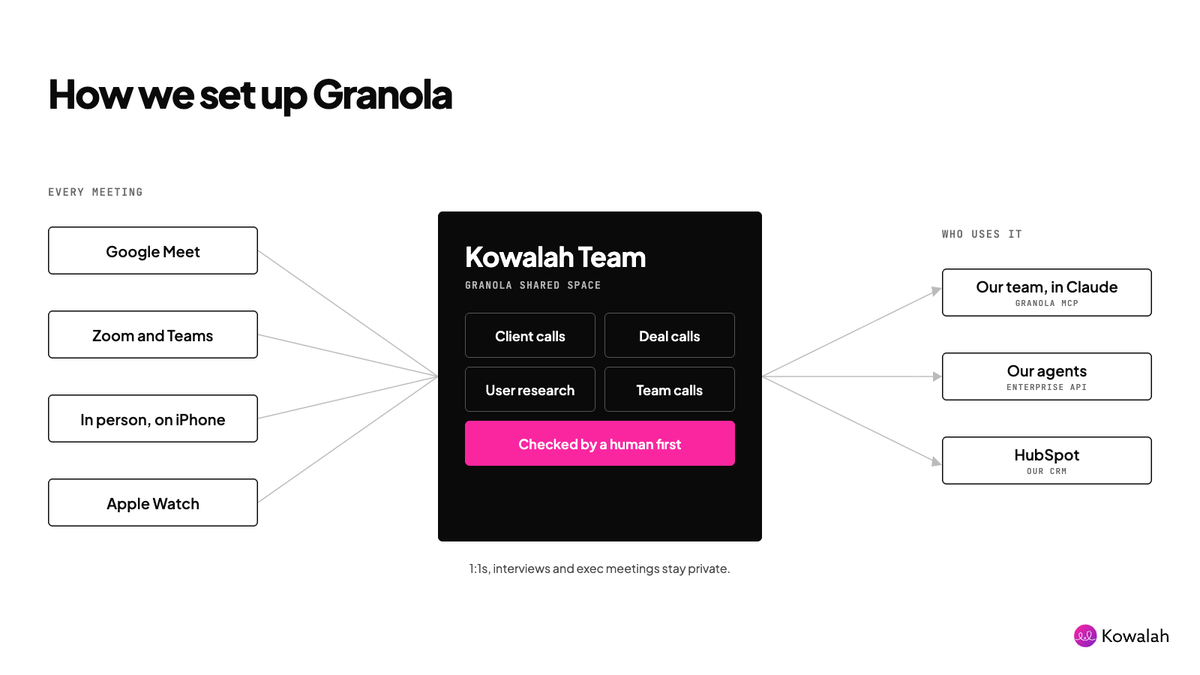
We have a shared space called "Kowalah Team" and within that we set up sub folders for Client Calls, Deal Calls, User Research, Team Calls - any meeting that goes into these folders is available to anyone in the company including the Enterprise API.
Granola is connected up to Google Calendar (so it knows what meetings are coming up), HubSpot (to put meetings into CRM), and everyone has it on their laptop, phones, and most recently - Apple Watch.
How we use Granola to transcribe meetings
The user kicks off Granola, usually by starting the meeting from Granola's notification, and Granola posts a little note in Google Meet "Hey I'm using Granola to transcribe this meeting" and we'll mention it during intros.
The meeting runs as it would normally, except - because we and the client know we are transcribing we will go into more detail in some areas.
I channel my inner police interviewer persona "for the purposes of the tape, could you go through that process in a bit more detail - who does that, why do they do that, when do they do that"
I would never be able to go into that detail in my own notebook and pen (which I absolutely love and still use for in-meeting notes), Granola is an uplift on my analogue note-taking.
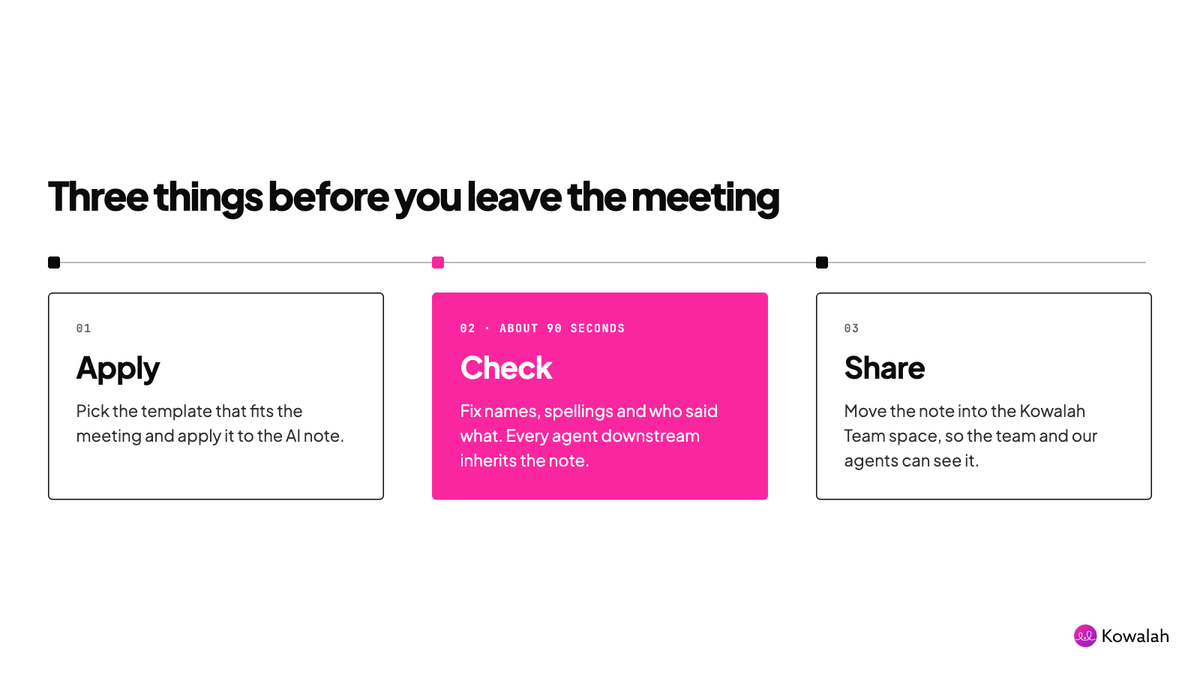
Once the meeting is complete (we use Google Calendar's speedy meetings to try to finish at 35 or 50 minutes past the hour), we ask our team to do two things before they move on:
- Pick the most relevant template and ask Granola to apply it
- Read the AI note and change anything misinterpreted (comment attributed to the wrong person, a brand name misspelt)
This second point is important - everything that happens after this depends on this transcription. If Kowalah is spelt Kooalaa or Pietr is spelt Peter then every human or agent that queries this transcript in future will perpetuate the inaccuracy blaming their current tool - when it was the source transcript.
We learned this the hard way. At first we skipped the check, and errors in the notes flowed straight into our other systems and agents. Now a human always checks the note before moving on. It takes about 90 seconds.
The final step is to move the meeting into the Kowalah Team folder so it is accessible by the wider team.
This step matters more than it looks. The Enterprise API, and so every one of our agents, only sees meetings in the shared space. A note left in someone's personal space is invisible to them.
We encourage this for any meeting that is not confidential - 1:1s, interviews, exec meetings would all stay in the individual's space.
How we use the Granola notes
One of the pushbacks I hear on transcribing is "I like taking my own notes in a notebook" (so do I), or I type notes really fast (I don't think this makes for a good meeting experience).
However, the transcribed notes are not only for you, or anyone that was in the room. They are for the people that weren't in the room.
Humans
There are many scenarios where someone else needs to understand what happened in a meeting, or series of meetings but was not in the originals. A good example is the handover of a new client from the sales team to service delivery.
Multiple meetings with multiple stakeholders and the seller's handover is one line. Now your delivery team can have a full discussion with Granola about the meetings to date.
A second example is a senior leader trying to uncover trends across multiple customers "what are prospects saying about our pricing?", "when customers churn, what do they say in the previous meetings that could flag it?", "what are our sellers saying when introducing our newest products?"
If you don't have this rich source of content you just can't ask these questions.
Agents
Where we are having most success is giving our agents access to Granola. The agents weren't in the meetings because they aren't human at all - but we want Karolina (our AI project manager), Roger (strategy advisor) and Mark (finance partner) to have the same insight our humans do.
Granola MCP
Our humans have access to Granola through the Granola MCP which we enable in Claude. This means any of our humans can ask Claude about a specific client, deal, or wider topic and the Granola connector will go and search for relevant meetings and report back.
Enterprise API
On the Enterprise plan you get access to the Enterprise API which allows you to build new applications off any calls put into your shared space - "Kowalah Team" in our case.
We have built a Granola connector into our Agent MCP server that all of our internal agents use - Karolina, Krista, Brian and the rest of the gang (20+ at the time of writing). You can meet the team in our agent library.
Each agent is able to search and use Granola notes in the same way as a human.
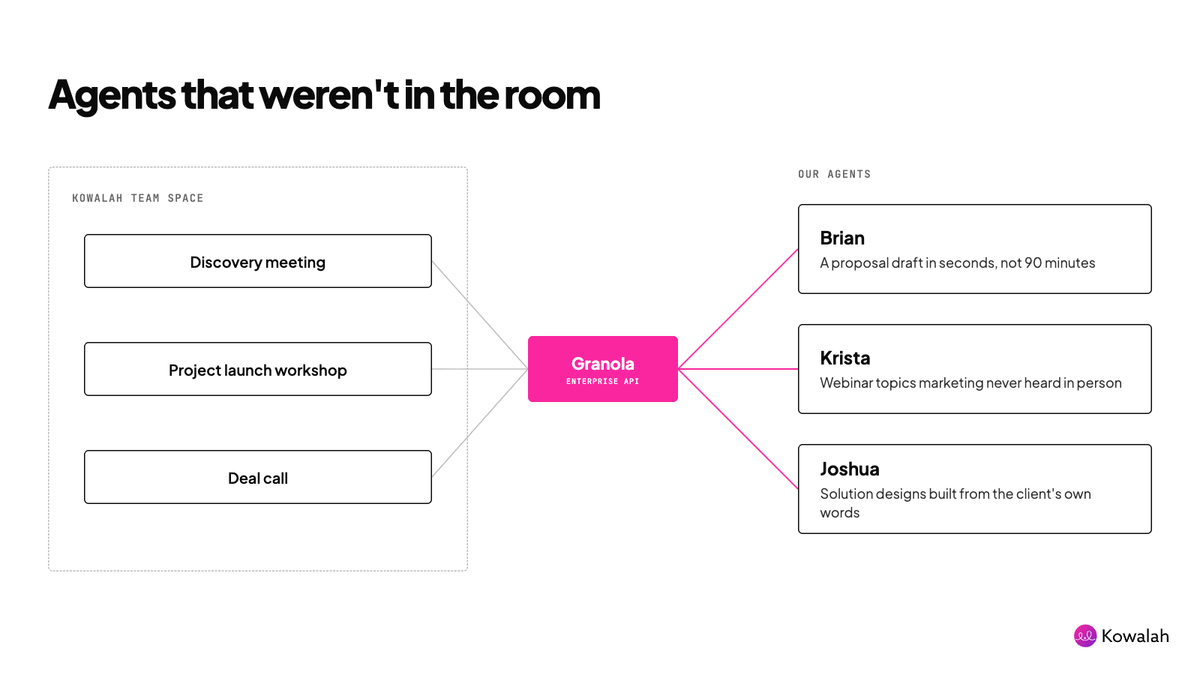
Krista, our demand generation agent, uses them to find webinar topics in customer conversations. She surfaces ideas we would never have found, because our marketing team wasn't in those meetings.
Joshua, our solution architect, uses them to come up with solution designs based on customers' calls.
Brian, our sales operations partner, uses them to draft our proposals. He pulls the client's requirements from several meetings in seconds and produces a first draft that would have taken me 90 minutes. And it's better than the one I'd have written.
And so on...
Our agents would be running blind if they did not have access to this material - it really is like they were in the meetings themselves.
Why I'd give up HubSpot first
HubSpot tells me what stage a deal is at. Granola tells me why: what the client is worried about, who really makes the decision, and what they said when we talked price.
One is a record of what we typed in. The other is a record of what was actually said. Our people and our agents can only act on what they know, and Granola is where most of that knowledge lives.
I've been a salesperson. I've been in that three hour meeting and updated Salesforce afterwards "Good meeting, agreed to move forward". Where is all the detail and nuance that an agent or your wider team need to work on?
Set it up like we do
- Give everyone a Granola account and make transcribing every meeting the default.
- Say you're transcribing during intros, every time.
- Build templates for your five most common meeting types.
- Check the AI note before you leave the meeting, especially names and brand spellings.
- Move every non-confidential meeting into one shared team space.
- Keep 1:1s, interviews and exec meetings in personal spaces.
- Connect Granola to Claude so anyone can ask questions across meetings.
- Give your agents the same access through the Enterprise API.
Want to see how we do it?
Watch the Granola webinar to see it in action, or talk to our team about connecting Claude to the tools you already use, Granola included.
Go deeper:
- Granola and organisational intelligence: our webinar with the Granola team.
- Granola security and privacy FAQs: audio deletion, SOC 2 Type II, the GDPR data processing addendum, retention and model training.
- Granola MCP: how to connect Granola to Claude.
- Granola Enterprise API: what your agents can reach, and which notes they can see.
- How we built Karolina: the architecture behind our AI project manager.
Enjoyed this?
Weekly insights for executives navigating enterprise AI. A five-minute read.