Insights
Single agent vs multi-agent: which design should your Claude agents use?
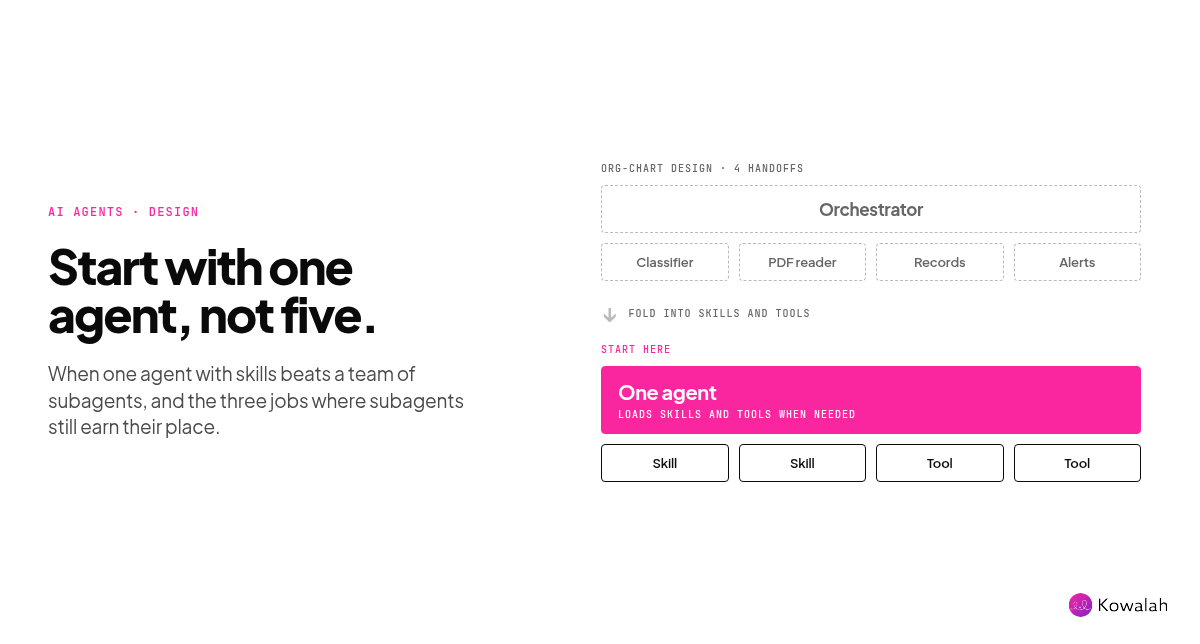
Start with one agent. On 22 October, Anthropic's Applied AI team said that across several enterprise deployments, a single agent with skills often beat both a one-prompt-for-everything design and a team of specialist subagents on quality, and often at lower cost and latency. Subagents still earn their place for three jobs: parallel work that can be thrown away, context that would swamp the main agent, and instructions that genuinely conflict. Everything else is usually better as a skill or a tool.
This is for CIOs and AI Ops leads at UK organisations of 1,000 to 10,000 people who are designing their first Claude agents, or wondering why the ones they have are slow, expensive or hard to debug.
Why this came up this week
Anthropic published Building agents: when to fold subagents into your main agent loop on 22 October, with an open-source migration kit that audits each subagent and tests whether to keep it. Its companion piece, when to use multi-agent systems, says multi-agent builds typically use 3 to 10 times more tokens than a single agent for the same task.
Builders noticed. One post summarising the guide passed 60,000 views, and the common reading was blunt: most subagents are your org chart, not your architecture.
We heard the same question twice in client conversations this week. One team asked whether to keep its operations agent as one simple agent or split it into specialists. Another asked when to build a new agent and when to add skills to the one they already have.
The three designs, side by side
- One prompt for everything. A single agent with every rule and tool loaded up front.
- One agent with skills and tools. A single agent that sees short descriptions of its skills and tools and loads the full detail only when it needs it. Anthropic calls this progressive disclosure.
- An orchestrator with specialist subagents. A coordinating agent that hands pieces of work to other agents, each with its own context, prompt and tools, and gets a summary back.
| One prompt for everything | One agent with skills and tools | Orchestrator with subagents | |
|---|---|---|---|
| What it is | Every rule and tool loaded up front | Short descriptions; full skills and tools load when needed | A coordinator hands work to specialist agents and gets summaries back |
| Answer quality | Drops as rules pile up and conflict | Often the best in Anthropic's enterprise comparisons | Detail lost at each handoff |
| Token cost | Grows with every rule added | Often lower for the same task | Typically 3 to 10 times a single agent |
| Speed | Fine until the prompt bloats | Often faster | Slower: one customer saw about 2x faster runs after moving to a single loop |
| Who owns it | Everyone edits one prompt | A small central team owns the prompt; business teams own skills and tools | Each team owns a subagent; nobody owns the whole result |
| Debugging | Hard: rules conflict | One trace to follow | Many traces and handoffs |
| Best for | Small, simple jobs | Most process work | Parallel research, isolated context, genuinely conflicting roles |
When a single agent wins
For most process work, one agent with skills and tools is the better starting point. Anthropic gives three reasons:
- Shared context gives better answers. An agent that has seen every earlier step can connect them. Subagents hand back summaries, and each handoff loses detail.
- Progressive disclosure stops context bloat. That was the main reason teams split work up in the first place. Anthropic says it cut Claude Code's system prompt for its more advanced models by over 80%, partly by loading skills and tools on demand.
- Models can now manage more in one loop. Since Opus 4.5, models have handled far more in a single loop than most teams expected. A simpler loop is also easier to move to the next model. Anthropic says rigid multi-agent structures were often what stopped a new model doing more of the work.
There's a human reason too. In one of this week's conversations, the person who would maintain the agent pushed back on a manager-plus-ten-subagents design. Their point: the team isn't technical, and needs to understand why the agent did something. They'd pay a small premium for an agent the team could debug.
When subagents earn their place
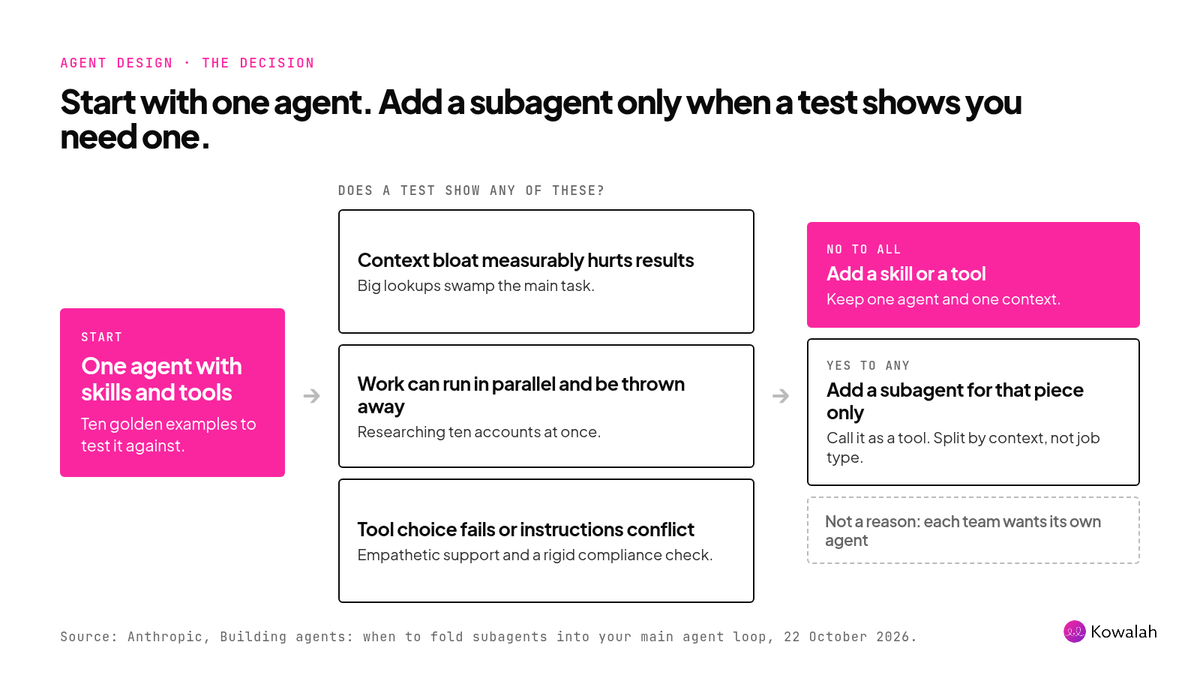
Anthropic is clear that subagents still have a job. Use one when:
- A single agent shows measurable decline from context bloat.
- Several tasks can run in parallel with fresh context that's thrown away afterwards, such as researching ten accounts at once.
- The agent struggles to choose the right tool, or its instructions genuinely conflict, such as an empathetic support tone and a rigid compliance check.
Two more patterns work well. A verification subagent checks finished work against clear criteria without needing the history of how it was built. And a cheaper model for bulk steps can make sense: our own daily project-update agent hands research on each live project to Haiku subagents and then pulls the results together. That's parallel, disposable work, and it cut the agent's daily running cost by roughly 80%.
The test is how you split the work. Split by context, not by type of work. An agent that plans a task should usually also do it and check it, because it already holds the context. Split planning, doing and reviewing across three agents and you get what Anthropic calls a telephone game, where each handoff degrades the message.
The org-chart trap
The most useful line in Anthropic's guide isn't technical. It warns that enterprises often give each team or problem type its own subagent, until the agent's design is a copy of the org chart.
The symptoms will be familiar to anyone who has run a shared intranet:
- Subagent sprawl: hundreds of overlapping agents, no standards, no clear owner.
- The Frankenprompt: every team adds a sentence to the system prompt, so the rules conflict and the voice wobbles.
- Local scores: each team tests its own piece, nobody owns the end-to-end result, and leaders decide on flattering numbers.
So this is an operating model decision as much as a design one. Anthropic's answer: one small central team owns the system prompt and end-to-end quality, and vets every new skill, tool and test before it ships. Business teams own skills and tools, not agents. That's the same model we recommend for a company skill library.
A fictional worked example
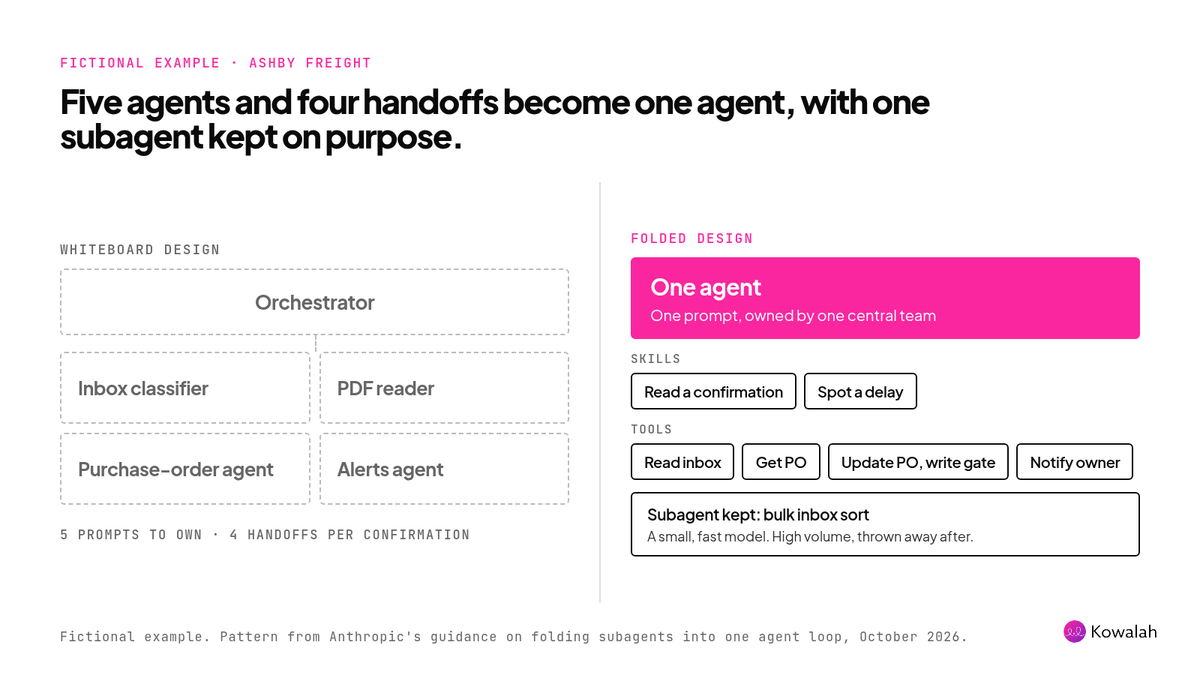
Ashby Freight, a fictional 2,500-person UK logistics firm, wants an agent to read supplier order confirmations from a shared inbox, check them against purchase orders, update the record and warn the right person about delays.
The first design on the whiteboard has five agents: an inbox classifier, a PDF reader, a purchase-order agent, an alerts agent and an orchestrator. Each would have its own prompt and owner. Every confirmation would pass through four handoffs.
The folded design is one agent with:
- Skills for how Ashby reads a confirmation and what counts as a delay.
- Four tools: read the inbox, get a purchase order, update a purchase order and notify the order owner. The update tool has a write gate, so the agent can't change a record above a set value without approval.
- One subagent, kept on purpose: a cheap, fast model sorts the inbox in bulk each morning and hands back only the confirmations. That's high-volume, disposable work, which is exactly where a subagent pays.
Ashby's agent is easier to explain to the finance team, easier to test, and ready for the next model.
How to decide for your own agents
- Write ten golden examples first. Anthropic says ten is enough to start an end-to-end test. Include every rule the agent must never break.
- Start with one agent. One clear system prompt, a handful of thin tools grouped by what the user wants done, and firm output rules. Anthropic notes that tool choice tends to degrade beyond 30 to 50 tool definitions, so use tool search and load the rest on demand.
- Put hard limits in the tools, not the prompt. Instructions in a prompt are probabilistic. Permissions, approval gates and validation belong in the tools, where they're enforced every time. Each tool can check what the calling user may see, so one agent can serve people with different access.
- Add a subagent only when a test shows one of the three problems. Fold or add one at a time. Look at which tasks flipped, not just the total score, and run each task more than once. In Anthropic's own sample, a break showed up in only one run out of two.
- Expect version one to be imperfect, and review monthly. Treat a new agent like a new starter. Each month, look at where it lacked access or instructions, and fix the skill or tool.
Before any agent acts on its own, decide who signs off what. Our guide to setting human approvals by risk covers that.
Frequently asked questions
Is a multi-agent system better than a single agent?
Not by default. Anthropic says multi-agent systems are often used where a single agent would perform better, and that teams have spent months building them only to match the result with better prompting on one agent. They win for parallel research, isolated context and genuinely conflicting roles.
Do subagents cost more?
Usually. Anthropic's testing found multi-agent builds typically use 3 to 10 times more tokens for the same task, because context is duplicated and results are summarised at each handoff. They can still save money when a smaller model does high-volume, simple steps.
How many tools can one agent handle?
Anthropic suggests 20 or more tools is a warning sign, and that choice tends to degrade beyond 30 to 50 tool definitions. Its tool search feature loads tools on demand, which it says can cut token use by up to 85%.
Should each department have its own agent?
Usually not. Give departments ownership of skills and tools within a shared agent, with a small central team owning quality. Separate agents make sense where the user, channel or system access is genuinely different.
Does this apply if we only use Claude Enterprise, not the API?
The guidance is written for agents built on the Claude Platform. The principle carries over: build a shared skill library everyone uses, not a separate bot for every team.
Next step
List the agents and skills you already run, who owns each one and which could be folded together. In Kowalah, recording your agents, skills and the outcomes they deliver is free.
Kowalah is a UK Anthropic Implementation Specialist. If you're designing your first agents, or untangling a multi-agent build, talk to us.
Enjoyed this?
Weekly insights for executives navigating enterprise AI. A five-minute read.