Insights
Claude Enterprise pricing for agentic work: 7 myths, and what's true
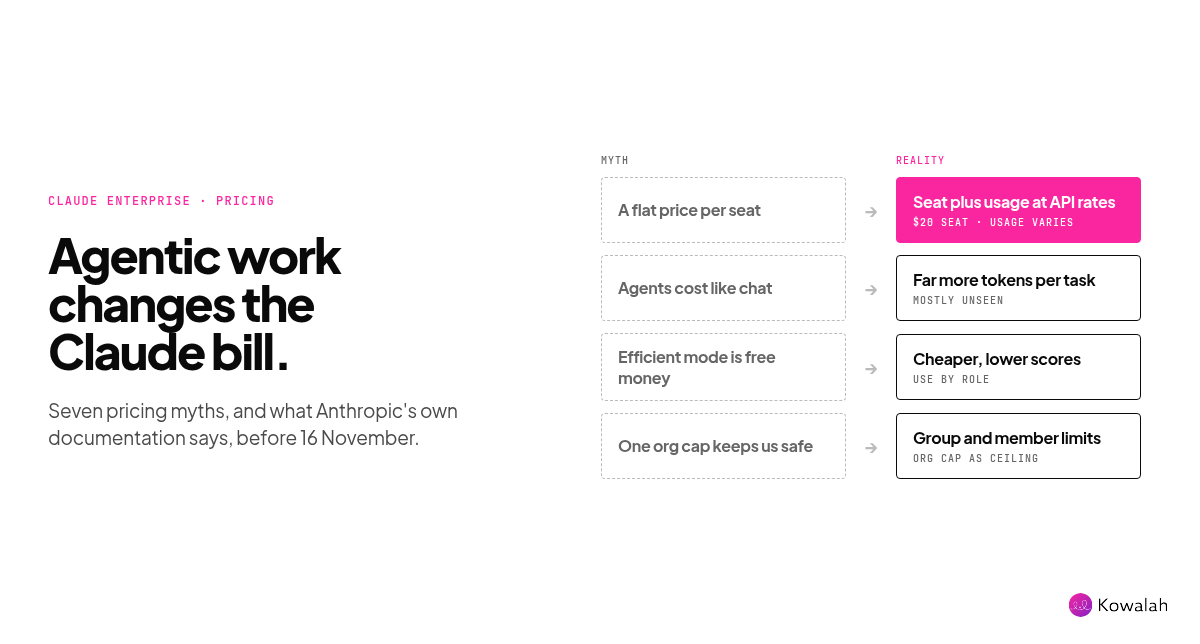
Claude Enterprise isn't priced like a software licence. It's a seat plus metered usage, and from 16 November most organisations' chat users can hand Claude whole tasks, not just questions. Seven myths about what that does to the bill are doing the rounds. Here's what Anthropic's own documentation says, and what to set before the date.
This is for CIOs, finance leads and AI Ops leads at UK organisations of 1,000 to 10,000 people who run, or are about to buy, Claude Enterprise.
Why pricing matters more this month
On 23 October, Anthropic brought chat and Cowork together for Claude Enterprise. Every conversation starts as a chat and carries on in a cloud sandbox when a task needs code or files. The admin guide says the setting turns on by default on 16 November 2026, unless an owner chooses Keep disabled. Our 16 November analysis covers the switch itself. This piece is about the money.
Myth 1: "Claude Enterprise is a flat per-seat price"
Reality: it's a seat fee plus usage at API rates. Anthropic's pricing page lists Enterprise at US$20 per seat per month, billed annually, with a 20-seat minimum, plus usage billed at API rates. In its words, "cost scales with the models and tasks your team runs."
So the seat is the predictable part. Usage is the part that moves, and it moves with behaviour, not headcount. Budget for both lines separately. Our Team to Enterprise guide shows how to model the first year.
Myth 2: "Agentic work costs about the same as a chat"
Reality: it uses far more tokens, and users can't see most of them. Anthropic's consumption guide rates chat as lower intensity and Cowork and Claude Code as higher. It says agentic workflows "generate significant intermediate token usage that may not be visible to end users."
Anthropic's own announcement says the same thing more gently: "agentic work can use more tokens than a quick chat." That's the point of the change. People stop asking for a draft and start asking for the finished report. Expect usage per active user to rise, and plan for it rather than being surprised by it.
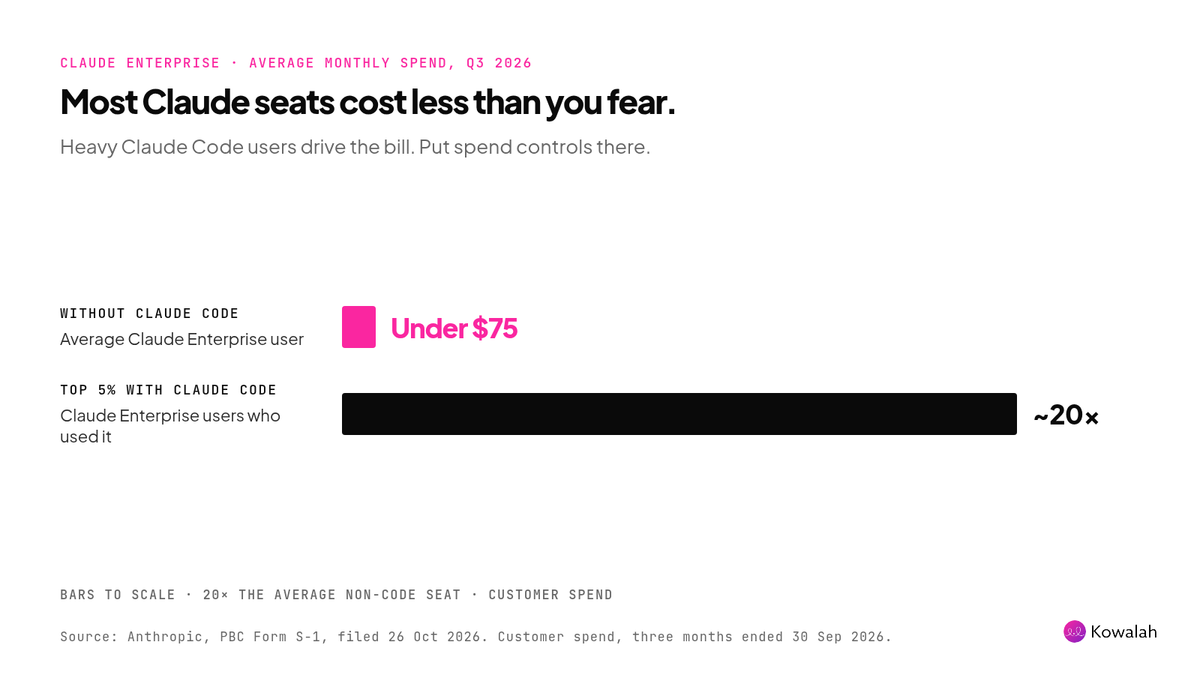
That rise is real for heavy agentic users, but it is not the average seat. In Anthropic's S-1 filing, for the three months ended 30 September 2026, Claude Enterprise users who did not use Claude Code spent less than $75 per month on average. That figure is customer spend (what organisations paid Anthropic), not Anthropic's own compute cost. The top 5% of Claude Enterprise users who used Claude Code spent approximately 20 times that amount. Spend controls matter most for heavy Claude Code users, not the whole workforce.
The good news is that the newest models are cheaper to run. Anthropic says Claude Opus 5.5 costs 40% less than Opus 5 on typical workloads, and Sonnet 5.5 up to 30% less than Sonnet 5 for most work. On the API price list, Opus 5.5 is $4 per million input tokens and $20 per million output, against $5 and $25 for Opus 5.
Myth 3: "Efficient mode halves the bill with no trade-off"
Reality: it saves money by giving up capability. With Efficient mode on, members can only use Sonnet and Haiku in the unified experience, and new sessions start on Claude Sonnet 5.5 at low effort. Other products, such as Claude Code, aren't affected.
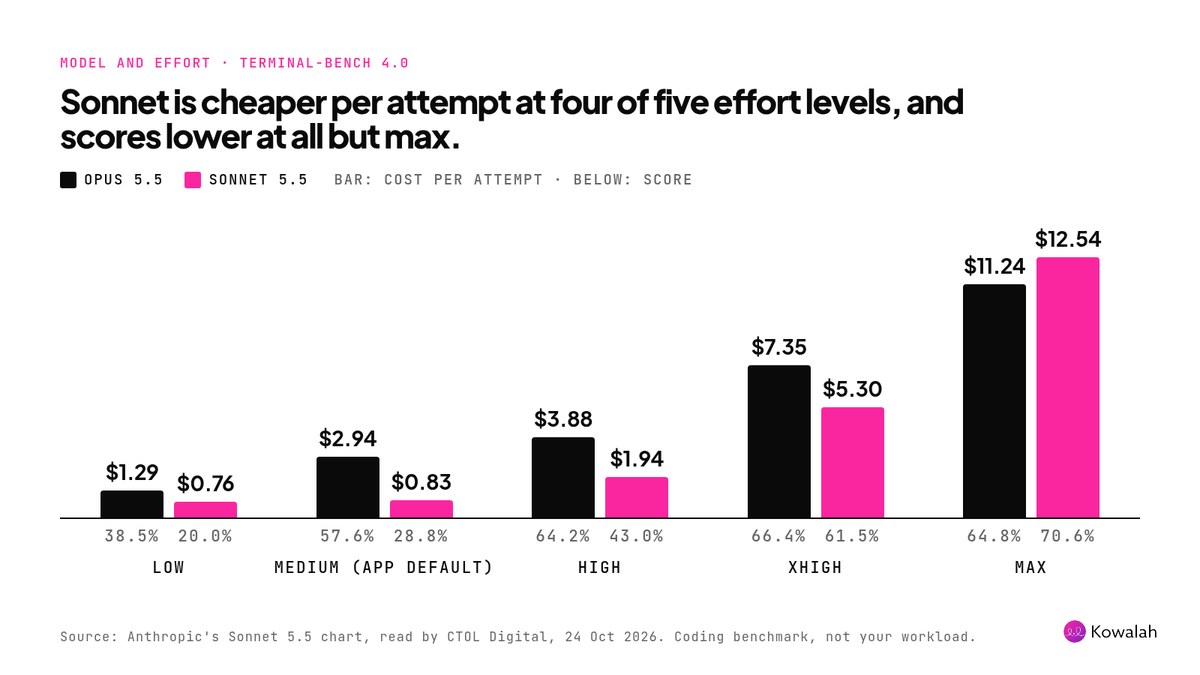
CTOL Digital read Anthropic's Terminal-Bench 4.0 chart, which prices each model at every effort level. At low effort, Sonnet 5.5 cost $0.76 an attempt and scored 20.0%. Opus 5.5 at medium effort, the default in Claude's apps, cost $2.94 and scored 57.6%. That's a benchmark of complex command-line tasks, not your workload, but the shape matters: a cheaper attempt that has to be rerun isn't cheaper.
Use Efficient mode where the work is routine and well scoped, by role, not as a blanket setting for everyone.
Myth 4: "Sonnet is always the cheap option"
Reality: model and effort together set the cost, not the model name. Sonnet 5.5 lists at half Opus 5.5's price per token: $2 and $10 per million input and output tokens, against $4 and $20. Anthropic says Sonnet 5.5 "complements Opus 5.5 best when running at lower effort settings," and that at higher settings "it can perform comparably at a similar cost."
On the same Terminal-Bench chart, Sonnet was cheaper per attempt at four of five effort levels. At maximum effort it cost more: $12.54 against $11.24 for Opus.
The lever most admins miss is effort. Anthropic's consumption guide lets you cap the maximum effort per model by role, set a default effort for each role's default model, and switch on "Always start with the default model and effort level" so people don't stay on whatever they used last.
Myth 5: "One organisation-wide cap keeps us safe"
Reality: it's a blunt instrument. The consumption guide warns that hitting the org-level limit "affects everyone simultaneously." Anthropic recommends starting with group limits through role-based access, plus per-user limits, and keeping the org limit as a hard ceiling.
Two newer tools help:
- Pooled group budgets (beta). A group gets one shared monthly amount. Every request counts against the member's own limit and the pool, and billing admins get alerts at 50%, 75%, 95% and 100%. When the pool runs out, the whole group pauses until an admin raises it or the month resets.
- Time at limit. The Usage page shows how often members hit their limits. Anthropic's advice is to investigate before raising a limit, because "members at their limit are often your top adopters."
Myth 6: "If we've set spend limits, everyone's covered"
Reality: a member with no limit anywhere has no limit. The guide is blunt: if a member has no individual limit and none of their groups has one, "their spend isn't capped." Individual limits always override group limits, whichever is higher. And if someone is in several groups, a setting decides whether the higher or lower group limit wins.
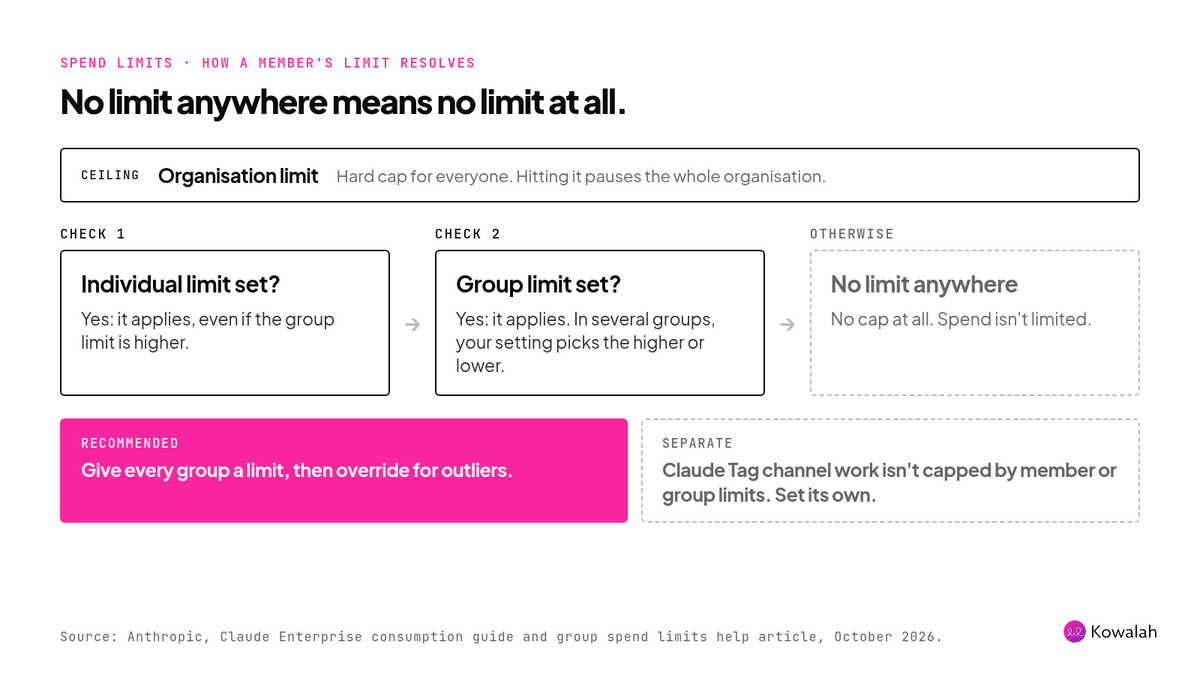
There's one more gap. Channel work in Claude Tag, Claude in Slack, bills to the organisation's usage balance, so per-user and group limits don't cap it. It has its own spend limit in the admin settings. If you've switched it on, set that too.
Myth 7: "The goal is the lowest possible bill"
Reality: the goal is value per pound. A low bill can just mean nobody is using Claude. In conversations with clients this month, we've seen both sides.
- One software company found inbox automations made up 58% of its Claude spend, at about $3 a run. The conversation was about moving routine automations to a cheaper model and effort level, not about a lower cap.
- A manufacturing group running agents close to its monthly limit asked whether every agent needed Opus, or whether Haiku could classify and Sonnet could handle the rest.
Anthropic's Skills view shows cost per use for every skill. Its suggested ROI sum is simple: value per run, minus cost per use, times the number of uses. Watch your reports, too. Once members move to the unified experience, their usage is filed under a new "Chat and Cowork unified" line. Leave it out and your chat and Cowork spend will seem to fall just as use goes up.
What to set before 16 November
- Separate the two budget lines. Seats are fixed for the year. Forecast usage from last month's actual spend, by group.
- Build four to six functional groups. Anthropic suggests groups by usage pattern, such as engineering or sales, not region, and warns that more than eight to ten gets hard to manage.
- Give every group a limit. Then add individual overrides for outliers. Check nobody is left with no limit at all.
- Set defaults by role. Default model, default effort and an effort cap. Turn on "Always start with the default model and effort level."
- Use Efficient mode by role. Routine, well-scoped work only. Review the results after two to four weeks.
- Try a pooled budget for one team. Pick a team with a fixed budget and uneven use. Set the member limit as a guard rail, not an equal share.
- Cap Claude Tag separately if you've enabled it.
- Fix your reports. Add the Chat and Cowork unified line, and use overall active users for headcount.
For the wider set of controls, see 10 ways to take control of your Anthropic spend. For who pays, see AI showback vs chargeback and the free showback and chargeback template.
Common questions
How much does Claude Enterprise cost?
Anthropic lists US$20 per seat per month, billed annually, with a 20-seat minimum, plus usage at API rates. Sales-assisted plans add options such as incentives on committed spend.
Does the 16 November change put our prices up?
Anthropic says pricing stays usage-based and your existing spend controls apply. What changes is behaviour: agentic tasks use more tokens than chat, so usage can rise.
Can we stop people using Opus?
Yes. Model entitlements set which models each role can use, and Efficient mode limits the unified experience to Sonnet and Haiku.
What happens when someone hits their limit?
The request in flight finishes, then further requests are blocked, so a long task may pause. Members can click "Request more usage" to ask an admin. Limits reset at 00:00 UTC on the first of each month.
Measure what the spend produces
Spend data tells you what Claude costs. It doesn't tell you what it's worth. Log each use case and its measured outcome, such as hours saved or cycle time, alongside the cost. If you log opportunities and outcomes in Kowalah, that part is free.
Kowalah is a UK Anthropic Implementation Specialist. If you'd like a second pair of eyes on your spend settings before 16 November, talk to us.
Enjoyed this?
Weekly insights for executives navigating enterprise AI. A five-minute read.